
MarbleMaze: Deep Dive — Adaptive Difficulty Engine
Generating infinite levels is only half the problem. The other half is making sure those levels feel appropriately hard — not so easy the player disengages, not so punishing they quit. This deep dive covers how I built an adaptive difficulty system that scales across three independent axes and responds to player performance in real time.
The Problem
A fixed difficulty curve works fine for a small set of hand-crafted levels. For a procedural game with no upper bound on level count, it falls apart. Players start the same place but their skill trajectories diverge quickly — one player breezes through the first 50 levels, another struggles at level 10. A single curve can’t serve both.
The system I built scales along three independent axes:
| Axis | What scales | Controlled by |
|---|---|---|
| Grid size | Level dimensions (maze complexity) | Level index |
| Hazard composition | Which tile types appear and how densely | Cycle archetype + multiplier |
| Difficulty multiplier | How aggressively hazards are applied | Player performance |
All three are computed in a single call at the start of each level:
// LevelManager.cs — GenerateRuntimeLevel()
RuntimeLevelParameters runtimeParams =
    RuntimeLevelProgression.GetParametersForLevel(
        levelIndex,
        tileDatabase_SO,
        levelCycleProgression_SO,
        levelsPerCycle,
        previousLivesLostToThisLevel,   // local performance
        failedTimes,                     // failure count
        globalDifficultyModifier.difficultyDebt  // cross-session debt
    );
The result is a RuntimeLevelParameters struct that overwrites the base GeneratorParameters_SO
before the maze generator runs.
Axis 1 — Grid Size Progression
The most visible form of difficulty scaling is the physical size of the maze. A 5×10 grid is a short, narrow corridor. A 15×30 grid is a sprawling multi-path maze.
Size grows across five discrete phases, each lerped smoothly within its range:
// RuntimeLevelParameters.cs
int lvl = levelIndex + 1;

void LerpSize(int startLevel, int endLevel,
              int startW, int endW,
              int startH, int endH)
{
    float t = Mathf.InverseLerp(startLevel, endLevel, lvl);
    width  = Mathf.RoundToInt(Mathf.Lerp(startW, endW, t));
    height = Mathf.RoundToInt(Mathf.Lerp(startH, endH, t));
}

if      (lvl <= 10) LerpSize(1,  10,  5,  5,  10, 10);  // fixed intro size
else if (lvl <= 20) LerpSize(11, 20,  5,  7,  10, 15);  // width begins
else if (lvl <= 35) LerpSize(21, 35,  7,  10, 15, 20);  // height grows fast
else if (lvl <= 50) LerpSize(36, 50,  10, 15, 20, 25);  // both expand
else if (lvl <= 70) LerpSize(51, 70,  10, 15, 25, 30);  // height pushes further
else
{
    // Endgame: caps out around level 100
    float t = Mathf.Clamp01((lvl - 70) / 30f);
    width  = Mathf.RoundToInt(Mathf.Lerp(10, 15, t));
    height = Mathf.RoundToInt(Mathf.Lerp(25, 30, t));
}
Phase boundaries were chosen to front-load the feeling of growth — the player experiences the most dramatic change between levels 10 and 35, when height more than doubles. After level 70 the grid caps, and difficulty comes purely from hazard composition.
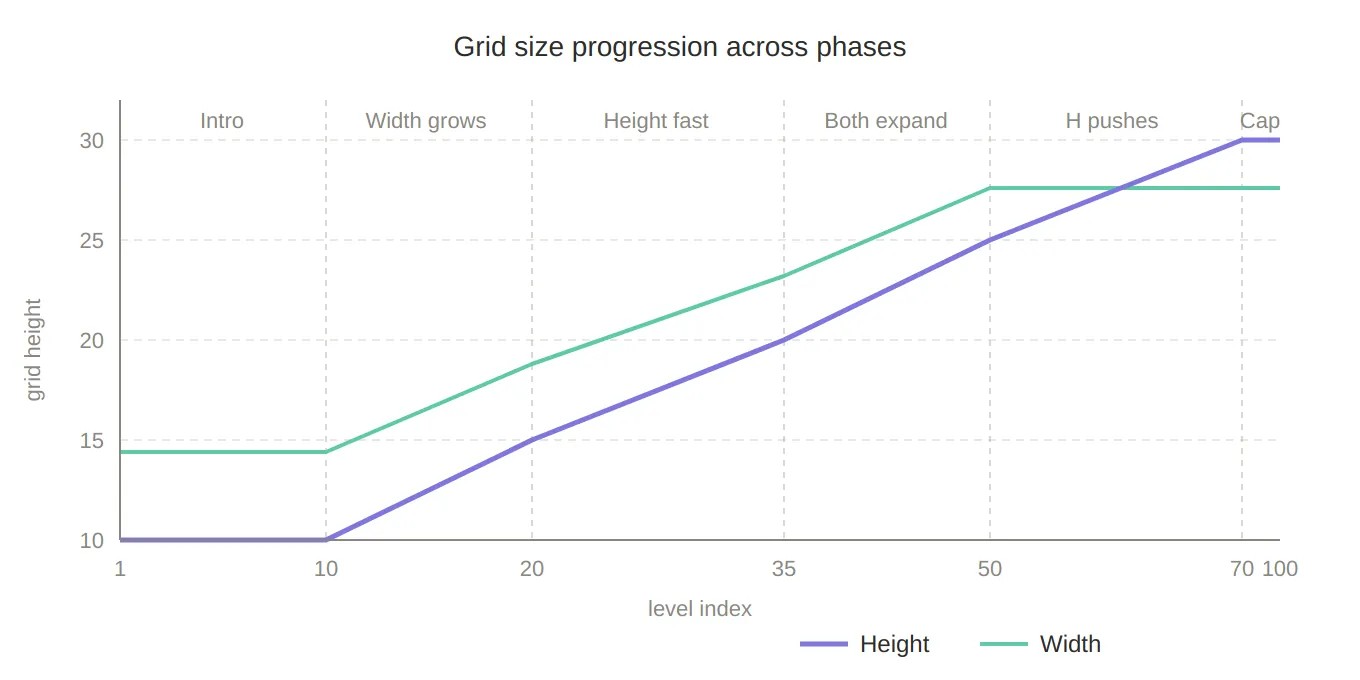
Grid size progression — a line chart showing how width and height grow across the five phases (levels 1–100), making the front-loaded height explosion between levels 10–35 visually obvious, and the cap after level 70 clear.
Star spacing also derives from height so that stars never feel trivially close on large mazes:
int minStarDistance = Mathf.Max(1, height / 3);Axis 2 — Cycle-Based Archetype Selection
Grid size controls how much space the player navigates; archetypes control what that space
is filled with. An archetype is a ScriptableObject that declares which hazard types should
appear in a level and at what base weight:
// LevelArchetypeData_SO.cs
public class LevelArchetypeData_SO : ScriptableObject
{
    public string archetypeName;

    [Serializable]
    public struct ModifierWeight
    {
        public GroundType groundType; // Ice, Piques, MovingPlatform …
        [Range(0f, 1f)]
        public float weight;          // 0 = inactive, 1 = dominant
    }

    public ModifierWeight[] modifiers;
    public int maxActiveModifiers = 2;
}
Archetypes are organised into cycles — groups of levelsPerCycle levels that share the
same set of allowed archetypes. A LevelCycleProgression_SO holds the ordered list of cycles
that the designer composes in the Unity inspector:
// LevelCycleProgression_SO.cs
public class LevelCycleProgression_SO : ScriptableObject
{
    public LevelArchetypeData_SO recoveryArchetype;
    public List<LevelCycleDefinition> cycles;
}

// LevelCycleDefinition.cs
public class LevelCycleDefinition
{
    public string cycleName;                          // e.g. "Precision Intro"
    public List<LevelArchetypeData_SO> allowedArchetypes;
}
The archetype for any level is selected deterministically from the cycle’s allowed list — no randomness here, because the designer needs to reason about what the player will encounter at each position within a cycle:
static LevelArchetypeData_SO SelectArchetype(
    LevelCycleProgression_SO progression,
    int cycleIndex, int cycleLevel, bool isRecovery)
{
    if (isRecovery) return progression.recoveryArchetype;

    int safeCycleIndex = Mathf.Clamp(cycleIndex, 0, progression.cycles.Count - 1);
    var cycle = progression.cycles[safeCycleIndex];

    // Rotate through the allowed archetypes by position within the cycle
    int archetypeIndex = cycleLevel % cycle.allowedArchetypes.Count;
    return cycle.allowedArchetypes[archetypeIndex];
}
cycleIndex = levelIndex / levelsPerCycle — the current cycle block.
cycleLevel = levelIndex % levelsPerCycle — the position within that block.
Once the last defined cycle is reached, safeCycleIndex clamps to it, so late-game levels
keep drawing from the final cycle’s archetypes indefinitely.
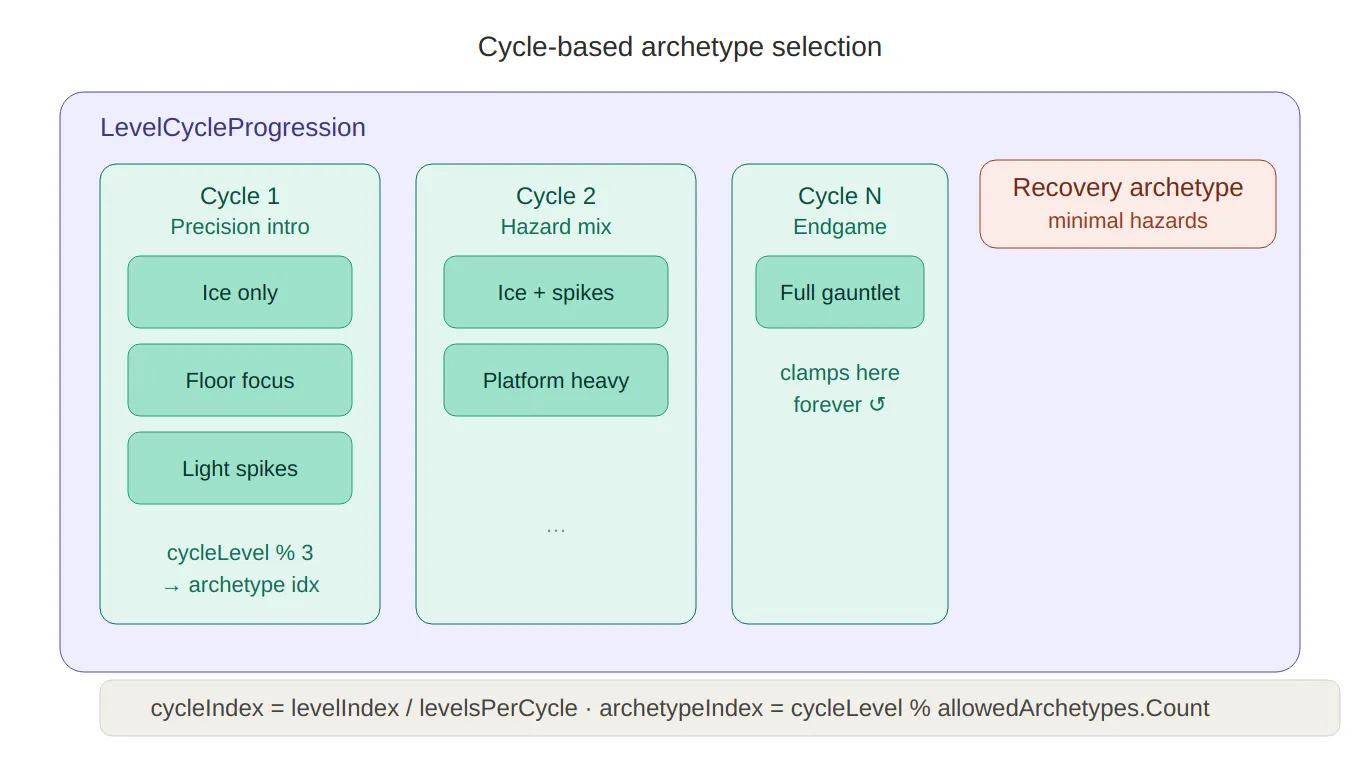
Cycle/archetype structure — a containment diagram showing LevelCycleProgression holding multiple cycles, each with its allowed archetypes, plus the recovery archetype sitting separately. The cycleLevel % count rotation logic is shown at the bottom.
Axis 3 — The Adaptive Difficulty Multiplier
The multiplier is what makes the system responsive. It is computed fresh every level from two independent signals: local stress (what happened this specific level) and global debt (accumulated pressure across the session).
Local Multiplier — Per-Level Stress
The local multiplier is derived from how many lives the player lost on the previous attempt and how many times they have failed the same level outright:
// RuntimeLevelParameters.cs
static float GetDifficultyMultiplier(int livesLost, int failedTimes)
{
    float multiplier = 1f;

    if      (livesLost >= 3) multiplier = 0.5f;   // game over → big relief
    else if (livesLost == 2) multiplier = 0.7f;   // moderate relief
    else if (livesLost == 1) multiplier = 0.85f;  // small nudge

    // Each failure shaves 5%, capped at 3 failures (−15%)
    int cappedFailures = Mathf.Min(failedTimes, 3);
    multiplier *= 1f - (0.05f * cappedFailures);

    return Mathf.Clamp(multiplier, 0.5f, 1f);
}
The failure penalty uses diminishing returns — the third failure has the same impact as the first, but you can never accumulate more than −15% from failures alone. This prevents the game from becoming trivially easy on a level the player keeps quitting immediately.
Global Debt — Cross-Session Pressure
The local multiplier resets every level. The global multiplier persists across multiple levels, carrying forward a difficulty debt that accumulates whenever the player loses lives:
// LevelManager.cs
void UpdateGlobalDifficulty(int livesLost)
{
    if (livesLost <= 0) return;

    float addedDebt = livesLost * 0.1f;  // 1 life = +0.1, 3 lives = +0.3

    globalDifficultyModifier.difficultyDebt =
        Mathf.Clamp01(globalDifficultyModifier.difficultyDebt + addedDebt);

    globalDifficultyModifier.remainingLevels = 4; // effect lasts 4 levels
}

void ConsumeGlobalDifficulty()
{
    if (globalDifficultyModifier.remainingLevels <= 0)
    {
        globalDifficultyModifier.difficultyDebt = 0f; // debt expires
        return;
    }
    globalDifficultyModifier.remainingLevels--;
}
The debt is then converted to a multiplier via a simple Lerp:
static float GetGlobalDifficultyMultiplier(float difficultyDebt)
{
    float maxRelief = 0.8f; // global can reduce difficulty by at most 20%
    return Mathf.Lerp(1f, maxRelief, difficultyDebt);
}
A difficultyDebt of 0 → multiplier 1.0 (no effect).
A difficultyDebt of 1 → multiplier 0.8 (maximum 20% relief).
The debt state is stored in a GlobalDifficultyState_SO ScriptableObject — a simple two-field
container that lives in the project and survives scene loads:
// GlobalDifficultyState_SO.cs
public class GlobalDifficultyState_SO : ScriptableObject
{
    public float difficultyDebt;   // 0 → no easing, 1 → max easing
    public int remainingLevels;    // how many more levels the debt persists
}
Combining Both Signals
The two multipliers multiply together to produce the final value passed into archetype application:
float localDifficultyModifier  = GetDifficultyMultiplier(livesLostThisLevel, failedTimes);
float globalDifficultyModifier = GetGlobalDifficultyMultiplier(globalDifficultyDebt);
float finalMultiplier          = localDifficultyModifier * globalDifficultyModifier;
At their minimum:
0.5 (local) × 0.8 (global) = 0.4 — hazard weights reduced to 40% of their designed value.
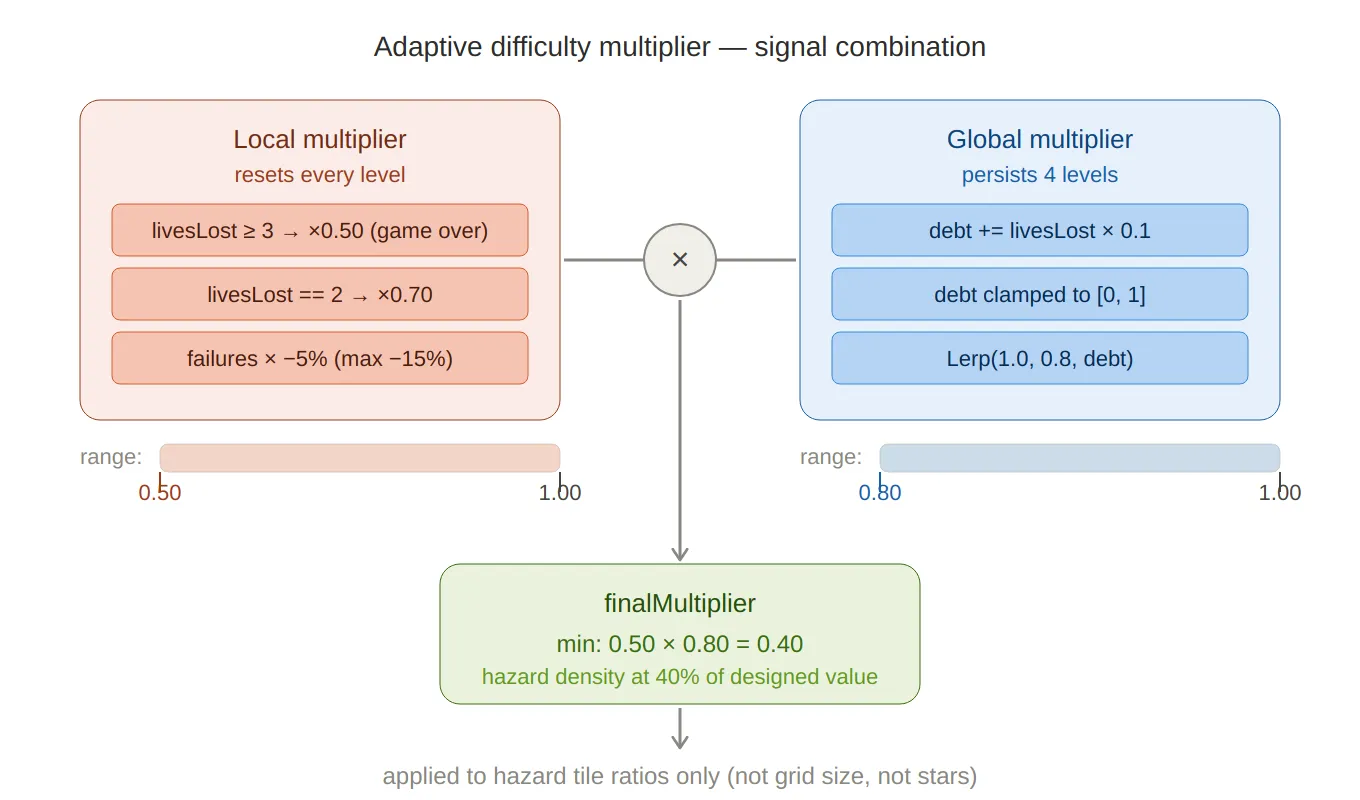
Multiplier combination — shows the two independent signals (local stress from lives lost, global debt accumulated over sessions), how they each produce a sub-multiplier in their own range, and how they multiply together to produce the final hazard density factor (minimum 0.40).
Applying the Multiplier — Archetype to Tile Ratios
The finalMultiplier is not applied to the level size or star count — it only affects
hazard tile ratios inside the active TileDatabase_SO. ApplyArchetypeData first
zeros every hazard’s ratio, then re-weights only the ones listed in the archetype:
static void ApplyArchetypeData(
    LevelArchetypeData_SO data, TileDatabase_SO tileDatabase,
    float cycleT, float difficultyModifier)
{
    // Clear all ratios first
    foreach (var hazardTile in tileDatabase.HazardTiles)
        hazardTile.ratio = 0;

    if (data == null || data.modifiers == null) return;

    foreach (var modifier in data.modifiers)
    {
        // Scale: archetype weight × position within cycle × difficulty multiplier
        float scaled = Mathf.Clamp01(modifier.weight * cycleT * difficultyModifier);

        HazardTileDefinition_SO hazardTile =
            tileDatabase.GetHazardByGroundType(modifier.groundType);

        // Never exceed the tile's designer-set maximum ratio
        hazardTile.ratio = Mathf.Min(hazardTile.maxRatio, scaled * hazardTile.maxRatio);
    }
}
cycleT is cycleLevel / (levelsPerCycle - 1) — the normalised position within the current
cycle (0 at the cycle’s first level, 1 at the last). This means hazards ramp up smoothly
across each cycle and reset to zero at the start of the next, giving the player a sense of
escalation and then relief.
The maxRatio cap on each HazardTileDefinition_SO is the designer’s safety valve — no
matter how the runtime modifies weights, a tile can never exceed the density that was
playtested as acceptable.
Hazard Variety Unlocking
Beyond density, the number of distinct hazard types active at once also scales with level.
ApplyHazardVariation runs after archetype application and trims the active hazard set down
to a target count, randomly disabling whichever ones are over the cap:
static void ApplyHazardVariation(int levelIndex, TileDatabase_SO tileDatabase)
{
    int lvl = levelIndex + 1;
    int targetActive;

    if      (lvl < 40)  targetActive = 1;
    else if (lvl < 70)  targetActive = UnityEngine.Random.Range(1, 3); // 1–2
    else if (lvl < 100) targetActive = UnityEngine.Random.Range(2, 4); // 2–3
    else
    {
        float r = UnityEngine.Random.value;
        if      (r < 0.6f) targetActive = 3;
        else if (r < 0.9f) targetActive = 2;
        else               targetActive = 4;
    }

    var active = tileDatabase.HazardTiles
        .Where(h => h.ratio > 0).ToList();

    int toDisable = active.Count - targetActive;
    for (int i = 0; i < toDisable; i++)
    {
        int idx = UnityEngine.Random.Range(0, active.Count);
        active[idx].ratio = 0;
        active.RemoveAt(idx);
    }
}
Early levels introduce hazards one at a time — the player learns each type in isolation before
combinations appear. The endgame weighted distribution (60% / 30% / 10%) keeps three hazard
types as the norm while leaving room for the occasional four-hazard surprise.
Recovery Levels
When a player is under maximum stress — both local and global debt at their ceiling — the system can inject a recovery level: a deliberately gentle maze generated from a dedicated archetype with minimal or no hazards.
Recovery is gated behind two conditions being true simultaneously:
static bool HasMaxDifficultyRelief(int livesLost, int failedTimes, float globalDifficultyDebt)
{
    bool maxLocalRelief  = livesLost >= 3;       // game-over territory
    bool maxGlobalRelief = globalDifficultyDebt >= 1f; // debt is maxed out
    return maxLocalRelief && maxGlobalRelief;
}
Requiring both prevents a single bad level from immediately triggering recovery — the player has to be consistently struggling. When the condition holds, recovery levels appear at a frequency that itself decreases as cycles progress:
static bool IsRecoveryLevel(int cycleIndex, int cycleLevel, bool hasMaxRelief)
{
    if (!hasMaxRelief) return false;

    // Frequency shrinks as the player advances: 6 → 5 → 4 → 3 (minimum)
    int recoveryFrequency = Mathf.Clamp(6 - cycleIndex, 3, 6);
    return (cycleLevel % recoveryFrequency) == recoveryFrequency - 1;
}
In early cycles a recovery level can appear every 6 levels; by cycle 3+ the minimum is every 3 levels. This ensures a struggling late-game player gets more frequent relief than a struggling early-game one — because late-game levels are objectively harder.
How It All Connects
Every piece feeds into LevelManager.GenerateRuntimeLevel:
// LevelManager.cs
private Grid GenerateRuntimeLevel(int levelIndex, LevelDatabase_SO database,
    GeneratorParameters_SO baseParameters, out int usedSeed)
{
    // Pre-authored levels take priority
    LevelData_SO existing = database.GetLevelDataAtIndex(levelIndex);
    if (existing != null) { usedSeed = existing.usedSeed; return existing.ToGrid(); }

    // Compute all runtime parameters
    RuntimeLevelParameters runtimeParams =
        RuntimeLevelProgression.GetParametersForLevel(
            levelIndex, tileDatabase_SO, levelCycleProgression_SO,
            levelsPerCycle,
            previousLivesLostToThisLevel,           // from previous attempt
            failedTimes,                             // total failures on this level
            globalDifficultyModifier.difficultyDebt  // cross-session debt
        );

    // Patch the base ScriptableObject with runtime values
    baseParameters.gridWidth       = runtimeParams.width;
    baseParameters.gridHeight      = runtimeParams.height;
    baseParameters.tileDatabase_SO = runtimeParams.tileDatabase_SO;
    baseParameters.minStarDistance = runtimeParams.minStarDistance;
    baseParameters.inputSeed       = -1; // force random seed

    return PxP.PCG.Generator.GenerateMaze(levelIndex, baseParameters, out usedSeed);
}
After a level ends, ProcessLevelData and MarkLevelAsFailed update the debt for the next call:
// On level complete:
ConsumeGlobalDifficulty();        // decrement remaining debt levels
UpdateGlobalDifficulty(livesLostThisLevel); // add new debt if lives were lost

// On level failed:
UpdateGlobalDifficulty(currentLivesLostToThisLevel);
currentLevelData.failedTimes++;
The debt is stored in a ScriptableObject, so it persists across scene loads without needing
any explicit serialisation on level transition.
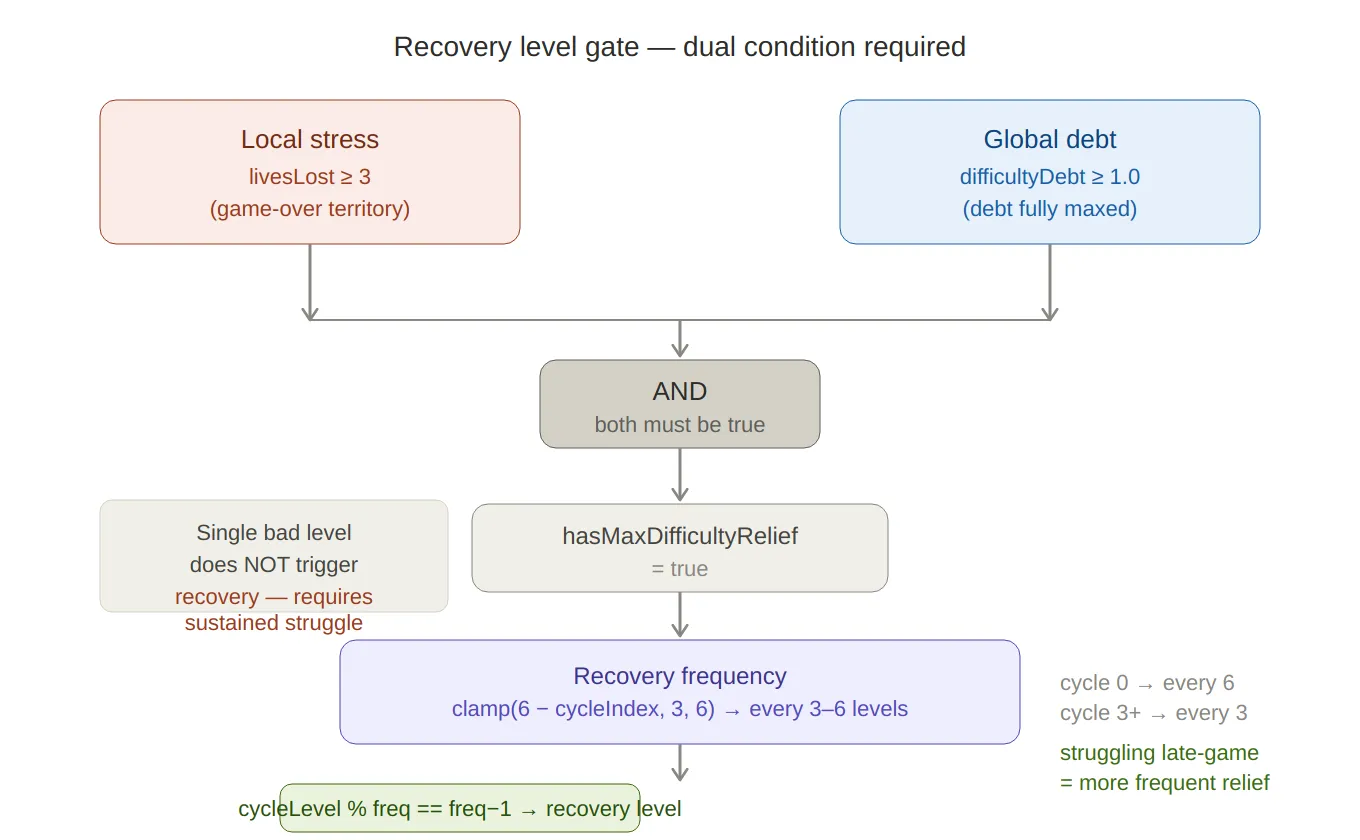
Recovery level gate — a flowchart showing the AND condition (both local stress AND global debt must be maxed), the frequency formula clamp(6 − cycleIndex, 3, 6), and the note that later cycles trigger recovery more often — because later levels are objectively harder.
Telemetry
Every level generates a LevelTelemetryEvent that logs the archetype, dominant modifier,
outcome, and duration to Firebase. This data was essential for validating the difficulty
curve during playtesting — particularly for confirming that recovery levels were triggering
at the right frequency and that debt was decaying at a reasonable pace.
// LevelTelemetryEvent.cs
public struct LevelTelemetryEvent
{
    public int    levelIndex;
    public int    cycleIndex;
    public string archetypeName;
    public string dominantModifier; // which GroundType dominated this level
    public string result;           // "success" / "fail" / "quit"
    public int    attemptNumber;
    public float  duration;
}
Summary
| Component | Role |
|---|---|
RuntimeLevelProgression | Stateless calculator — takes performance data, returns parameters |
GlobalDifficultyState_SO | Persistent debt store (ScriptableObject, survives scene loads) |
LevelArchetypeData_SO | Designer-authored hazard composition per archetype |
LevelCycleProgression_SO | Ordered sequence of cycles with their allowed archetypes |
LevelManager | Owns player performance state, accumulates debt, drives generation |
HazardTileDefinition_SO.maxRatio | Per-tile safety cap — playtested ceiling the runtime never exceeds |
Key design decisions:
RuntimeLevelProgressionis a static, stateless class. It receives all the inputs it needs and returns a struct. No singleton, no side effects — easy to unit test, easy to call from an editor window.- Debt lives in a ScriptableObject. This sidesteps serialisation ceremony on scene transition and makes it inspectable in the editor during playtesting.
- Local and global signals multiply, not add. Additive relief could stack into a combined value below the intended floor; multiplication keeps both signals proportional and the output bounded without extra clamping logic.
- Recovery requires both signals at maximum. A single bad level doesn’t trigger a recovery; the player has to be genuinely struggling across multiple levels before the system steps in.