
MarbleMaze: Deep Dive — GC-Friendly Grid Data Structure
The procedural generator at the heart of MarbleMaze runs every time a new level starts. On mobile, that means it needs to produce a complete maze — including hazard decoration and star placement — without triggering the garbage collector. This post is about the data structure that makes that possible.
The Problem with a Naive Approach
The obvious first instinct for a grid of cells is a 2D array of objects:
// What you might reach for first
Cell[,] grid = new Cell[width, height];
If Cell is a class, every element is a heap-allocated object with a GC header and
a pointer stored in the array. Accessing a cell involves two indirections: the array lookup
gives you a reference, and the reference points to the object somewhere on the heap.
On a 15×30 grid that is 450 separate heap allocations, each a potential GC target.
More importantly, modifying a cell means reading the reference, following the pointer, and mutating the object in place. Since the pipeline modifies every carved cell multiple times across three decoration passes, this creates significant pointer-chasing pressure — bad for CPU cache locality, and even worse on a mobile CPU with a small L1 cache.
The solution is to make the cell a value type.
CellData — A Struct That Carries the Full Cell State
Every cell in the maze is represented by a single CellData struct:
// CoreData.cs
[System.Serializable]
public struct CellData
{
    public bool isEmpty;                    // true = wall, false = walkable
    public GroundType ground;               // Floor, Ice, Piques, MovingPlatform …
    public OverlayType overlay;             // None, Start, End, Star
    public bool isEnd;
    public bool isHorizontal;              // orientation for line-of-three hazards
    public bool requiresTwoSolidNeighbours; // placement constraint flag
}
Being a struct means:
- There is no GC header — structs aren’t tracked by the garbage collector
- There is no heap allocation per cell — the data lives directly inside the containing array
- The entire grid is a single contiguous block of memory — CPU prefetching works efficiently when iterating row by row
- Passing a
CellDatato a method returns a copy — no accidental shared-state mutations
The [System.Serializable] attribute is not cosmetic — it is what allows Unity to include
CellData values inside a ScriptableObject array for pre-authored level storage
(covered later in the serialization section).
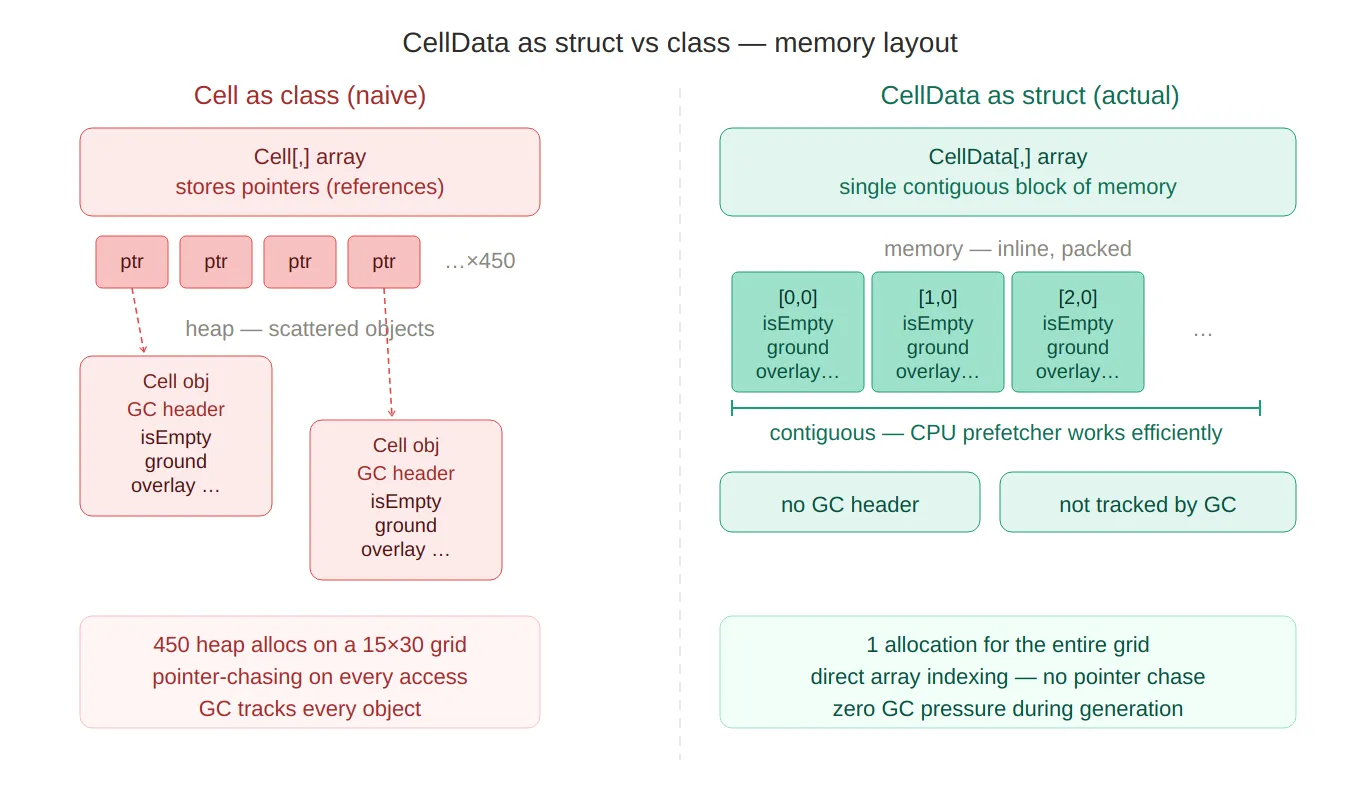
Struct vs class memory — side-by-side comparison of Cell as a class
(450 scattered heap objects, pointer chasing, GC headers) versus
CellData as a struct (one contiguous block, direct array indexing, zero GC tracking).
The red vs green colour coding makes the performance story immediately legible.
Grid — The Wrapper That Provides the Interface
CellData is a primitive. Navigating a flat 2D array by raw index everywhere would make
the codebase brittle. The Grid class wraps the 2D array and provides a clean API:
// CoreData.cs
public class Grid
{
    private CellData[,] cells;

    public int Width  => cells.GetLength(0);
    public int Height => cells.GetLength(1);

    public Grid(int width, int height)
    {
        cells = new CellData[width, height];
    }

    public bool IsInside(int x, int y)
        => x >= 0 && y >= 0 && x < Width && y < Height;

    public bool IsInside(Vector2Int position)
        => IsInside(position.x, position.y);
}
Grid itself is a class — deliberately so. The generation pipeline passes the same grid
through six separate stages. If Grid were a struct, every method call would copy the
entire 2D array. As a class, it passes by reference with no copying overhead.
This is the classic C# trade-off: cells are value types (cheap to store, safe to read), the container is a reference type (cheap to pass, shared ownership).
Two Accessor Patterns
The most important design decision in the Grid API is exposing two distinct ways to
access a cell, each with a different intent.
GetCell — Safe Copy for Reading
public CellData GetCell(int x, int y)    => cells[x, y];
public CellData GetCell(Vector2Int pos)  => cells[pos.x, pos.y];
GetCell returns a value copy of the struct. This is the right choice for read-only
use: you get a snapshot of the cell’s current state that cannot accidentally modify the
underlying array, and the caller can store it in a local variable without concern.
// PhysicalMazeGenerator.cs — reads a copy to decide what to spawn
CellData cell = grid.GetCell(x, y);
if (cell.isEmpty) return;
SpawnGround(cell, basePosition, x, y);
GetCellRef — Direct Reference for Writing
public ref CellData GetCellRef(int x, int y)        => ref cells[x, y];
public ref CellData GetCellRef(Vector2Int pos)       => ref cells[pos.x, pos.y];
GetCellRef returns a ref — a managed reference to the struct that lives inside the
array. Mutating the returned ref modifies the array element directly, with no intermediate
copy:
// MazeGenerator.cs — writes directly into the array via ref
ref var cell = ref grid.GetCellRef(pos);
cell.isEmpty = false;
cell.ground  = chosen.groundType;
Without ref, the equivalent would require a copy-modify-assign round trip:
// What it would look like without ref — one extra copy per write
CellData cell = grid.GetCell(pos);
cell.isEmpty  = false;
cell.ground   = chosen.groundType;
grid.SetCell(pos.x, pos.y, cell); // write back
Across thousands of cells and three decoration passes, eliminating that copy-assign is
meaningful. More importantly, the ref pattern makes the intent explicit — the caller
signals at the call site that it is about to mutate the cell, not just inspect it.
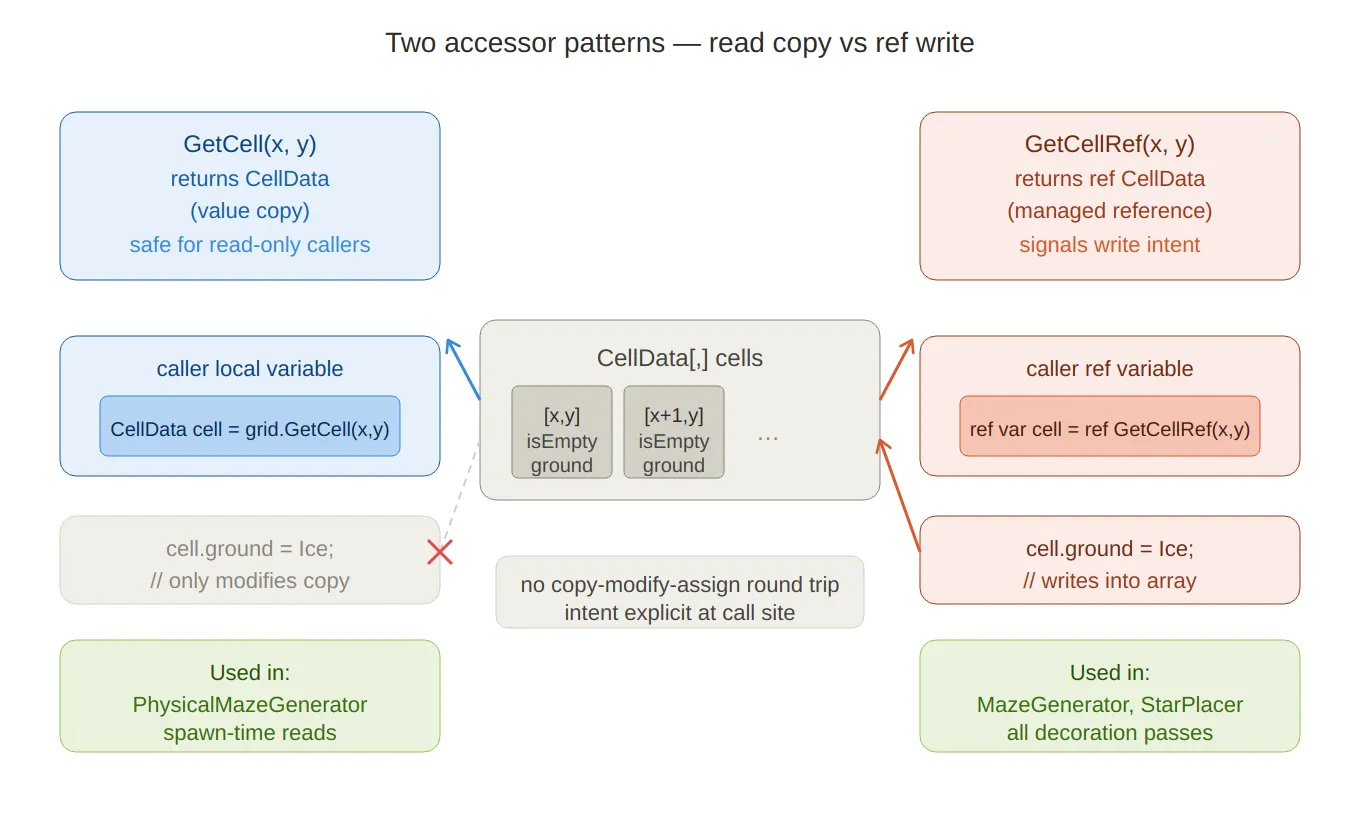
Two accessor patterns — shows GetCell returning a value copy to the left
(safe for reads, mutations don’t reach the array) and GetCellRef returning a managed ref
to the right (writes go directly into the array, no round-trip). The crossed arrow on the left
makes it clear that mutating a copy has no effect on the underlying data.
The ref Pattern in Practice
Once you see it in one place, you’ll notice it everywhere in the generator:
// GridUtils.cs — forces a floor tile at the start position
ref var cell = ref grid.GetCellRef(start.x, start.y);
cell.isEmpty = false;
cell.ground  = GroundType.Floor;
// MazeGenerator.cs — ApplyTwoSolidTiles pass
ref var cell = ref grid.GetCellRef(pos);
cell.ground = hazard.groundType;
cell.isEmpty = false;
cell.requiresTwoSolidNeighbours = true;// StarPlacer.cs — marks a cell as a star overlay
grid.GetCellRef(pos.x, pos.y).overlay = OverlayType.Star;// LevelData_SO.cs — populates a new Grid from serialized data
ref var cell = ref grid.GetCellRef(x, y);
cell = gridData[y * gridWidth + x]; // struct assignment — full copy in one lineThe last example is worth noting: assigning one struct to another in C# copies all fields in a single instruction. There is no custom copy constructor, no hidden allocation — it is just a memory copy of the struct’s size.
Query API
Beyond the two core accessors, Grid exposes a set of query methods for the rest of the
codebase to use without knowing about the internal array layout:
// 4-directional neighbours as copies — safe for constraint checks
public List<CellData> GetNeighbours4(int x, int y) { … }

// Filtered queries using predicates — used by archetype tools and debug windows
public List<CellData> GetCellsWhere(Func<CellData, bool> predicate) { … }
public List<CellData> GetCellsWithGround(GroundType groundType)     { … }
public List<CellData> GetCellsWithOverlay(OverlayType overlayType)  { … }
public List<CellData> GetNonEmptyCells() { … }
public List<CellData> GetEmptyCells()    { … }
These return List<CellData> — copied values, not references. They are designed for
querying, not mutation. Any code that needs to modify cells uses a separate loop with
GetCellRef rather than mutating out of a query result.
Two methods address the specific spatial problem of finding valid positions near the level’s exit tile — used by the player-spawn system after generation:
// 8-directional neighbours of the End cell, with walkability filtering
public bool TryGetWalkableEndNeighbours(out List<Vector2Int> positions) { … }
public bool TryGetEndNeighbours(out List<(Vector2Int pos, CellData cell)> neighbours) { … }
The 8-way version exists because the exit can be placed at the edge of the maze, where strictly 4-directional adjacency might return zero walkable neighbours.
GridFactory — Initialization Convention
Before any generation runs, the grid needs a defined starting state. GridFactory.CreateWallGrid
initialises every cell as a wall (isEmpty = true) with a default floor ground type:
// GridFactory.cs
public static Grid CreateWallGrid(int width, int height)
{
    Grid grid = new Grid(width, height);

    for (int x = 0; x < width; x++)
        for (int y = 0; y < height; y++)
            grid.SetCell(x, y, new CellData
            {
                isEmpty = true,
                ground  = GroundType.Floor,
                overlay = OverlayType.None,
                isEnd   = false
            });

    return grid;
}
Starting as all-walls means the generator only ever carves open cells — it never
needs to re-close one. This simplifies every downstream pass: a cell with isEmpty == true
is unconditionally a wall, regardless of any other field values.
Serialization — Flattening to a 1D Array
Unity cannot serialize a 2D array (CellData[,]) in a ScriptableObject directly.
Pre-authored levels — hand-crafted layouts stored in the project — need to survive asset
serialization and be reconstructable at runtime.
LevelData_SO solves this by flattening the 2D grid into a 1D CellData[]
using the standard row-major index formula index = y * width + x:
// LevelData_SO.cs
[Tooltip("Flattened grid: index = y * width + x")]
public CellData[] gridData;
Two conversion methods handle the round-trip:
// Grid → flat array (for saving / exporting)
public void FromGrid(Grid grid)
{
    gridWidth  = grid.Width;
    gridHeight = grid.Height;
    gridData   = new CellData[gridWidth * gridHeight];

    for (int y = 0; y < gridHeight; y++)
        for (int x = 0; x < gridWidth; x++)
            gridData[y * gridWidth + x] = grid.GetCell(x, y);
}

// Flat array → Grid (for loading at runtime)
public Grid ToGrid()
{
    Grid grid = new Grid(gridWidth, gridHeight);

    for (int y = 0; y < gridHeight; y++)
        for (int x = 0; x < gridWidth; x++)
        {
            ref var cell = ref grid.GetCellRef(x, y);
            cell = gridData[y * gridWidth + x]; // struct copy — all fields at once
        }

    return grid;
}
Because CellData is a struct marked [Serializable], Unity’s serializer knows exactly
how to write and read each field. There is no custom serializer, no JSON intermediate —
just direct binary serialization of value types.
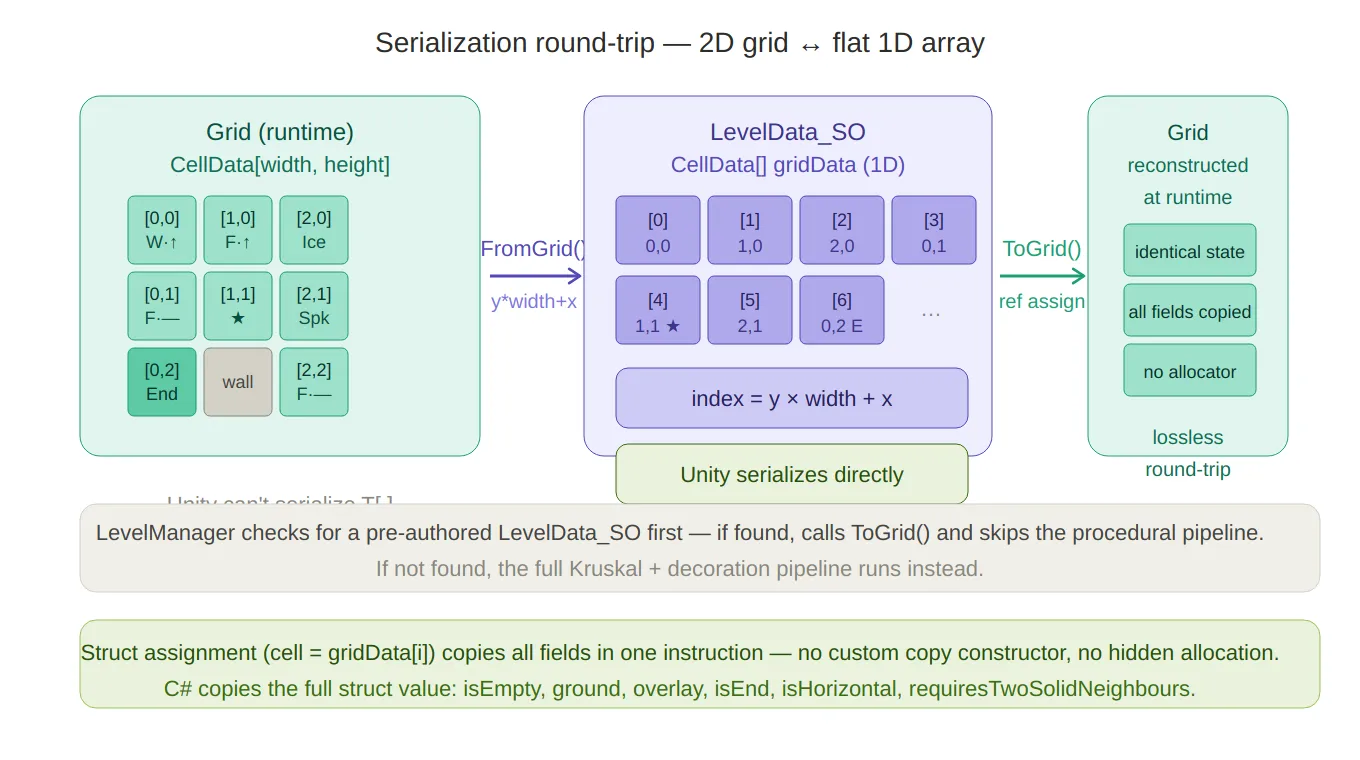
Serialization round-trip — traces the FromGrid() path (2D → 1D with y*width+x) and the ToGrid() path back,
with the actual cell slots rendered so you can see which index maps to which coordinate.
The bottom notes cover the struct-assignment single-instruction copy and the LevelManager fallback logic.
LevelManager checks for a pre-authored level first; if none exists, it falls through
to the procedural generator:
// LevelManager.cs — GenerateRuntimeLevel()
LevelData_SO existing = database.GetLevelDataAtIndex(levelIndex);
if (existing != null)
{
    usedSeed = existing.usedSeed;
    return existing.ToGrid(); // deserialize from flat array
}
// … otherwise run the procedural pipeline
Downstream Consumption — PhysicalMazeGenerator
Once the Grid is fully populated, PhysicalMazeGenerator iterates it to spawn
Unity GameObjects. At this stage, only read copies are needed — the generation phase
is over, so GetCell (not GetCellRef) is used throughout:
// PhysicalMazeGenerator.cs
for (int y = 0; y < height; y++)
{
    for (int x = 0; x < width; x++)
    {
        CellData cell = grid.GetCell(x, y); // read copy — no mutation

        Vector3 basePosition = GridToWorld(new Vector2Int(x, y));
        SpawnCell(cell, basePosition, x, y);
    }
}
One detail worth highlighting in the spawner: timed hazards (doors, platforms) need to start in alternating states so they don’t all open and close in sync. The spawner derives this from the cell’s grid position using a bitwise checkerboard pattern:
// PhysicalMazeGenerator.cs — SpawnGround()
if (ground.TryGetComponent<ITimedHazard>(out var hazard))
{
    bool isInverted = ((x + y) & 1) == 1; // true for odd-sum cells
    hazard.SetState(isInverted);
}
(x + y) & 1 is a fast parity check — equivalent to (x + y) % 2 == 1 but without
the division. Adjacent cells always have different parities, so neighbouring hazards
always start in opposite phases.
Full Lifecycle of a Grid
GridFactory.CreateWallGrid(w, h)
        │
        ▼
MazeGenerator.GenerateKruskalMaze  →  carved HashSet<Vector2Int>
        │
        ▼
GridUtils.MarkStartAndEnd          →  ref writes for Start/End overlay
        │
        ▼
MazeGenerator.ApplyMaze            →  ref writes across 3 decoration passes
        │
        ▼
StarPlacer.PlaceStars              →  ref writes for Star overlays
        │
        ▼
LevelManager.CurrentGrid           →  Grid held in memory for scene lifetime
        │
        ├── PhysicalMazeGenerator  →  GetCell reads → Instantiate GameObjects
        └── LevelData_SO.FromGrid  →  flatten to CellData[] for asset serialization
Every stage from creation to consumption uses the same Grid instance — passed by
reference, mutated in place during generation, then read-only during consumption.
No copies of the grid itself are made at any point in the pipeline.
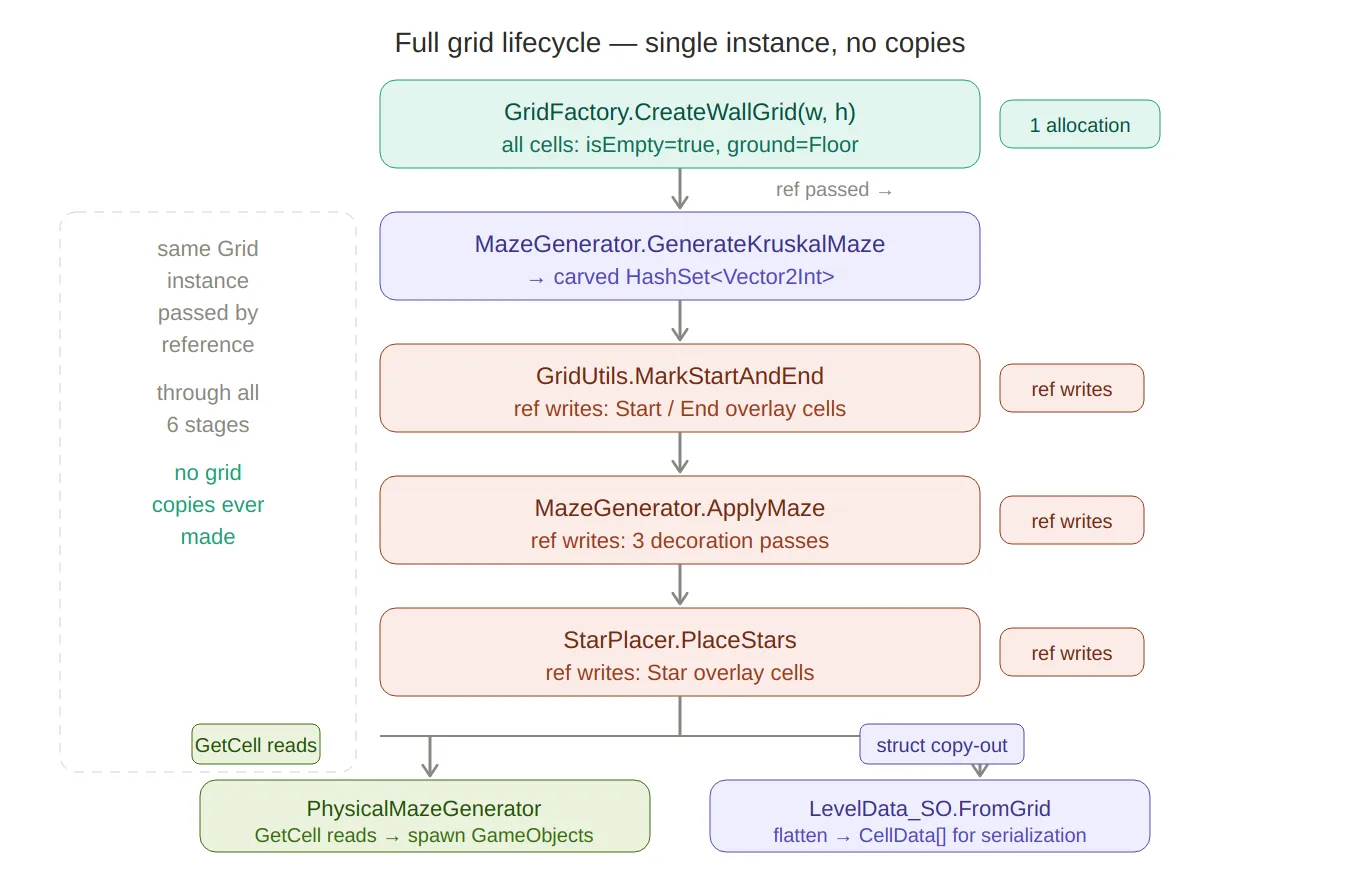
Grid lifecycle pipeline — the full six-stage flow from CreateWallGrid to the two downstream consumers
(PhysicalMazeGenerator for read-only spawning, LevelData_SO for serialization).
The dashed bracket on the left calls out that the same Grid instance passes through all stages —
no copies of the grid itself are ever made.
Summary
| Design choice | Reason |
|---|---|
CellData is a struct | No per-cell heap allocation; contiguous memory; no GC pressure |
Grid is a class | Reference semantics — same instance passes through all pipeline stages |
GetCell returns a copy | Safe default for read-only callers; prevents accidental mutation |
GetCellRef returns ref | Zero-overhead in-place mutation; signals write intent at the call site |
[Serializable] on CellData | Enables direct Unity serialization into LevelData_SO asset |
| Flat 1D serialization | Unity can’t serialize T[,]; y * width + x is the lossless round-trip |
| All-wall initialization | Single direction of change (carve open); no need to re-wall |
The grid design has no moving parts — no pooling, no custom allocators, no unsafe code.
The performance benefit comes purely from choosing the right built-in language feature
(struct, ref return) and using it consistently throughout the pipeline.