
MarbleMaze: Deep Dive — ScriptableObject-Driven Level Progression
One recurring challenge in procedural games is separating what the code does from what the designer decides. A game where tweaking difficulty requires recompiling is a game that’s painful to balance. This post covers how I used Unity’s ScriptableObject system to make every tunable parameter in MarbleMaze editable at design time — without a single code change.
The Architecture at a Glance
The system is built as three independent layers that compose at runtime:
Tile Layer
  TileDefinition_SO          — floor tile (prefab + rules)
  HazardTileDefinition_SO    — hazard tile (+ ratio, placement constraints)
  OverlayDefinition_SO       — overlays: Start, End, Star (prefab + y offset)
  TileDatabase_SO            — collects all of the above; builds lookup dictionaries

Progression Layer
  LevelArchetypeData_SO      — which hazards appear and at what base weight
  LevelCycleDefinition       — a named group of archetypes for one cycle
  LevelCycleProgression_SO   — ordered list of cycles + recovery archetype

State & Config Layer
  GeneratorParameters_SO     — base grid config (patched at runtime)
  GlobalDifficultyState_SO   — cross-session difficulty debt
  LevelDatabase_SO           — registry of hand-authored levels
No layer knows about the internals of the others. The generator receives a
TileDatabase_SO and a GeneratorParameters_SO; the progression system
modifies those before the generator runs.
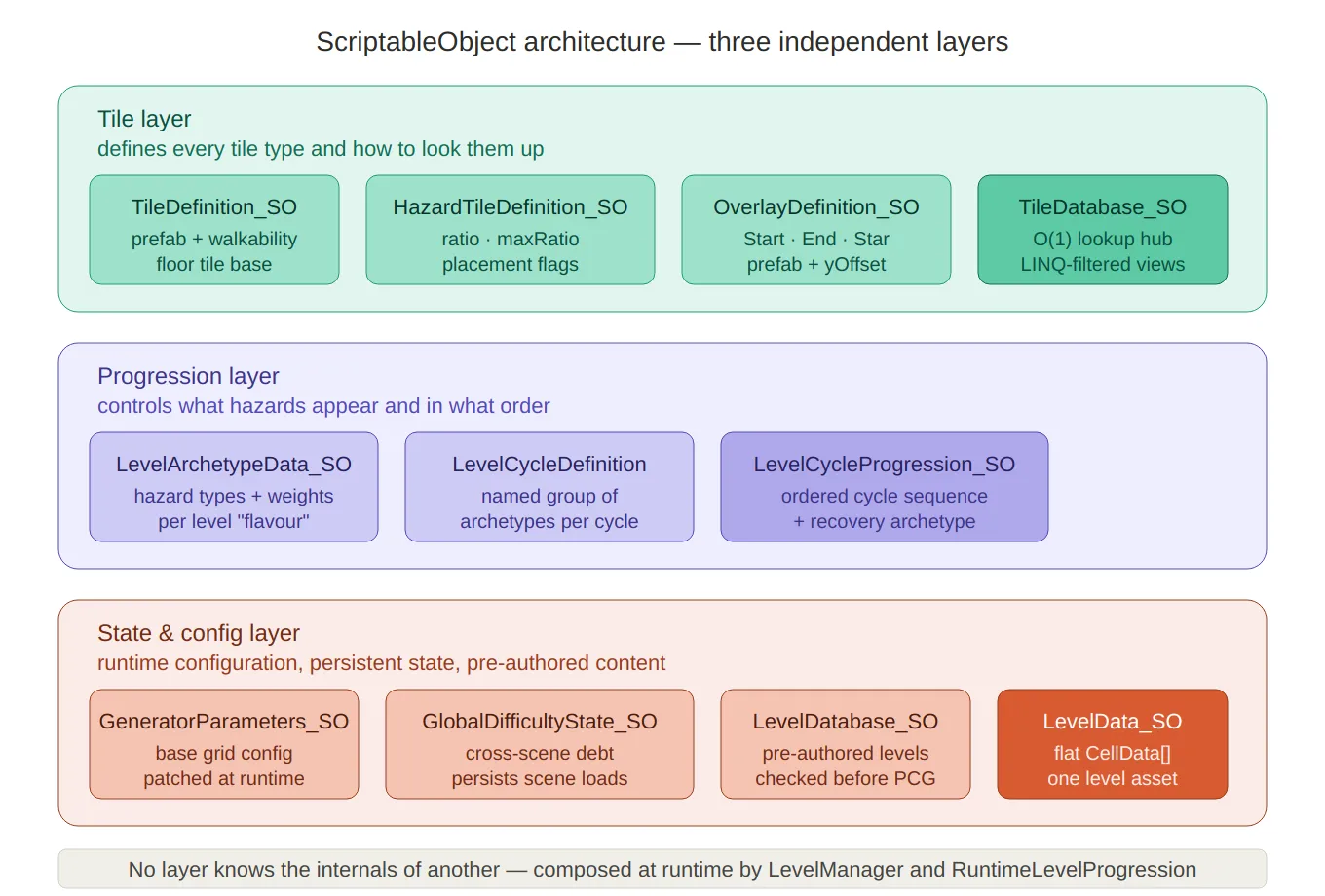
Three-layer architecture — the full containment diagram showing all eleven SO types grouped into their three independent layers (tile, progression, state/config), with the rule at the bottom that no layer knows the internals of another.
The Tile Layer
TileDefinition_SO — The Base Tile
Every tile type starts as a TileDefinition_SO. This is the minimal contract:
what GroundType it represents, which prefab to instantiate, and whether
the tile counts as walkable:
// TileDefinition_SO.cs
public class TileDefinition_SO : ScriptableObject
{
    public GroundType groundType;
    public GameObject tilePrefab;
    public Color tileEditorColor; // used in the editor grid preview
    public bool isWalkable;
    public bool awllowsOverlay;   // can a Star/End overlay sit on this tile?
}
The floor tile is a single instance of this base class — it has no spawn probability because it is the default. Every carved cell becomes a floor unless a hazard overrides it.
HazardTileDefinition_SO — Hazard Rules
Hazards extend the base tile with the information the generator needs to decide whether and how densely to place them:
// HazardTileDefinition_SO.cs
public class HazardTileDefinition_SO : TileDefinition_SO
{
    public float ratio;      // current weight — written at runtime by the difficulty system
    public float maxRatio;   // designer cap — the runtime never exceeds this

    // Placement constraint flags — control which generator pass handles this tile
    public bool requireTwoSolidNeighbours; // Pass 2: needs context
    public bool requiredLineOfThree;       // Pass 3: spawns as a 3-cell group
    public GroundType sideGroundType;      // for line tiles: the end-cap type
    public bool isHorizontal;
}
The two fields ratio and maxRatio encode a contract between the designer and the
runtime difficulty system: the designer sets maxRatio once in the inspector as the
maximum density that has been playtested and feels acceptable. The adaptive difficulty
system then modulates ratio freely between 0 and maxRatio — it can never exceed
the designer’s ceiling, no matter how much stress the player accumulates.
The placement constraint flags (requireTwoSolidNeighbours, requiredLineOfThree)
tell the generator which of its three decoration passes should handle this tile type.
Adding a brand-new tile type requires only a new HazardTileDefinition_SO asset and
the appropriate flag — no changes to the generator code.
OverlayDefinition_SO — Overlays
Overlays (Start, End, Star) sit on top of ground tiles. Each has its own prefab
and a yOffset that lifts it above the floor to the correct visual height:
// OverlayDefinition_SO.cs
public class OverlayDefinition_SO : ScriptableObject
{
    public OverlayType overlayType;
    public GameObject overlayPrefab;
    public float yOffset;
    public Color overlayEditorColor;
}
TileDatabase_SO — The Lookup Hub
TileDatabase_SO collects every tile and overlay into a single asset and builds
O(1) runtime lookup dictionaries on load. The inspector lists are the source of
truth; the dictionaries are an internal cache:
// TileDatabase_SO.cs
public class TileDatabase_SO : ScriptableObject
{
    [SerializeField] private TileDefinition_SO floorTile;
    [SerializeField] private List<HazardTileDefinition_SO> hazardTiles;
    [SerializeField] private List<OverlayDefinition_SO> overlays;

    // Runtime dictionaries — built on OnEnable and OnValidate
    private Dictionary<GroundType, TileDefinition_SO>      tilesByType;
    private Dictionary<GroundType, HazardTileDefinition_SO> hazardTilesByType;
    private Dictionary<OverlayType, OverlayDefinition_SO>   overlaysByType;

    public TileDefinition_SO      GetTileByGroundType(GroundType type)    => tilesByType[type];
    public HazardTileDefinition_SO GetHazardByGroundType(GroundType type) => hazardTilesByType[type];
    public OverlayDefinition_SO    GetOverlayByType(OverlayType type)     => overlaysByType[type];
}
Building the dictionaries happens in two places:
void OnEnable()   => BuildCache(); // called when the asset loads at runtime
#if UNITY_EDITOR
void OnValidate() => BuildCache(); // called every time the inspector changes
#endif
OnValidate is critical for the editor workflow: every time a designer adds or
reorders tiles in the inspector, the dictionary is rebuilt instantly without any
manual refresh step.
The database also exposes three LINQ-filtered views of the hazard list — one for each generator pass — so the generator never needs to know about the classification flags itself:
public IEnumerable<HazardTileDefinition_SO> SimpleHazards =>
    HazardTiles.Where(t => !t.requireTwoSolidNeighbours && !t.requiredLineOfThree);

public IEnumerable<HazardTileDefinition_SO> TwoSolidHazards =>
    HazardTiles.Where(t => t.requireTwoSolidNeighbours);

public IEnumerable<HazardTileDefinition_SO> LineHazards =>
    HazardTiles.Where(t => t.requiredLineOfThree);
The generator just calls db.SimpleHazards, db.TwoSolidHazards, and db.LineHazards
— it never inspects the flags directly.
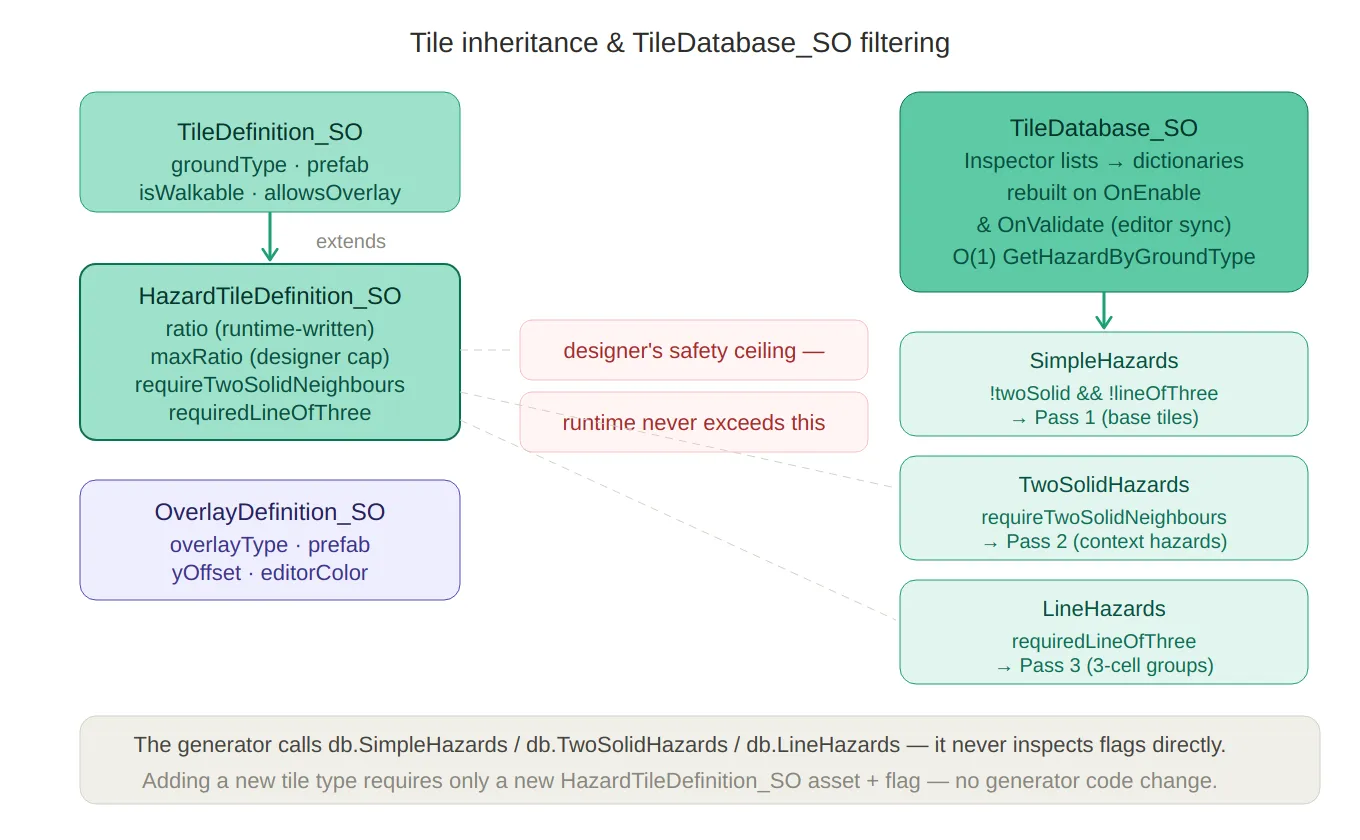
Tile hierarchy & filtering — the TileDefinition_SO → HazardTileDefinition_SO inheritance chain on the left,
with the maxRatio designer-ceiling callout, and on the right the TileDatabase_SO splitting its hazard list
into three LINQ-filtered views (SimpleHazards, TwoSolidHazards, LineHazards) that map directly to the three
generator decoration passes.
The Progression Layer
LevelArchetypeData_SO — Hazard Composition
An archetype is the designer’s answer to the question: “What kind of level is this?” It declares which hazard types should be present, and at what relative strength:
// LevelArchetypeData_SO.cs
public class LevelArchetypeData_SO : ScriptableObject
{
    public string archetypeName; // e.g. "Ice Precision", "Platform Rush"

    [Serializable]
    public struct ModifierWeight
    {
        public GroundType groundType;
        [Range(0f, 1f)]
        public float weight; // 0 = inactive, 1 = fully weighted
    }

    public ModifierWeight[] modifiers;
    public int maxActiveModifiers = 2;
}
Weights in an archetype are relative intentions, not final ratios. The runtime
multiplies each weight by cycleT (position within the cycle) and finalMultiplier
(the adaptive difficulty value) before writing it into the TileDatabase_SO:
// RuntimeLevelParameters.cs — ApplyArchetypeData()
foreach (var modifier in data.modifiers)
{
    float scaled = Mathf.Clamp01(modifier.weight * cycleT * difficultyModifier);
    HazardTileDefinition_SO hazardTile = tileDatabase.GetHazardByGroundType(modifier.groundType);
    hazardTile.ratio = Mathf.Min(hazardTile.maxRatio, scaled * hazardTile.maxRatio);
}
This means a designer setting weight = 1.0 on an Ice modifier is saying
“make ice as prominent as the difficulty system allows”, not “always fill the
level with ice”. The adaptive system governs the ceiling.
LevelCycleDefinition and LevelCycleProgression_SO
Archetypes are grouped into cycles — blocks of levelsPerCycle levels that
share a curated set of archetypes:
// LevelCycleDefinition.cs
public class LevelCycleDefinition
{
    public string cycleName;                          // shown in the inspector
    public List<LevelArchetypeData_SO> allowedArchetypes;
}

// LevelCycleProgression_SO.cs
public class LevelCycleProgression_SO : ScriptableObject
{
    public LevelArchetypeData_SO recoveryArchetype; // injected when player is struggling
    public List<LevelCycleDefinition> cycles;       // ordered by cycle index
}
The archetype for a given level is selected deterministically by position within the cycle — no randomness, so designers can reason about what the player will see at each slot:
// RuntimeLevelParameters.cs
int cycleIndex = levelIndex / levelsPerCycle;  // which cycle block
int cycleLevel = levelIndex % levelsPerCycle;  // position within the block

int archetypeIndex = cycleLevel % cycle.allowedArchetypes.Count;
return cycle.allowedArchetypes[archetypeIndex];
Once the last defined cycle is reached, the system clamps to it — so the final cycle effectively becomes the endgame loop without any extra code.
The recoveryArchetype is a separate asset shared across all cycles. When the
difficulty engine determines the player needs relief, it substitutes this archetype
regardless of what the cycle would normally assign.
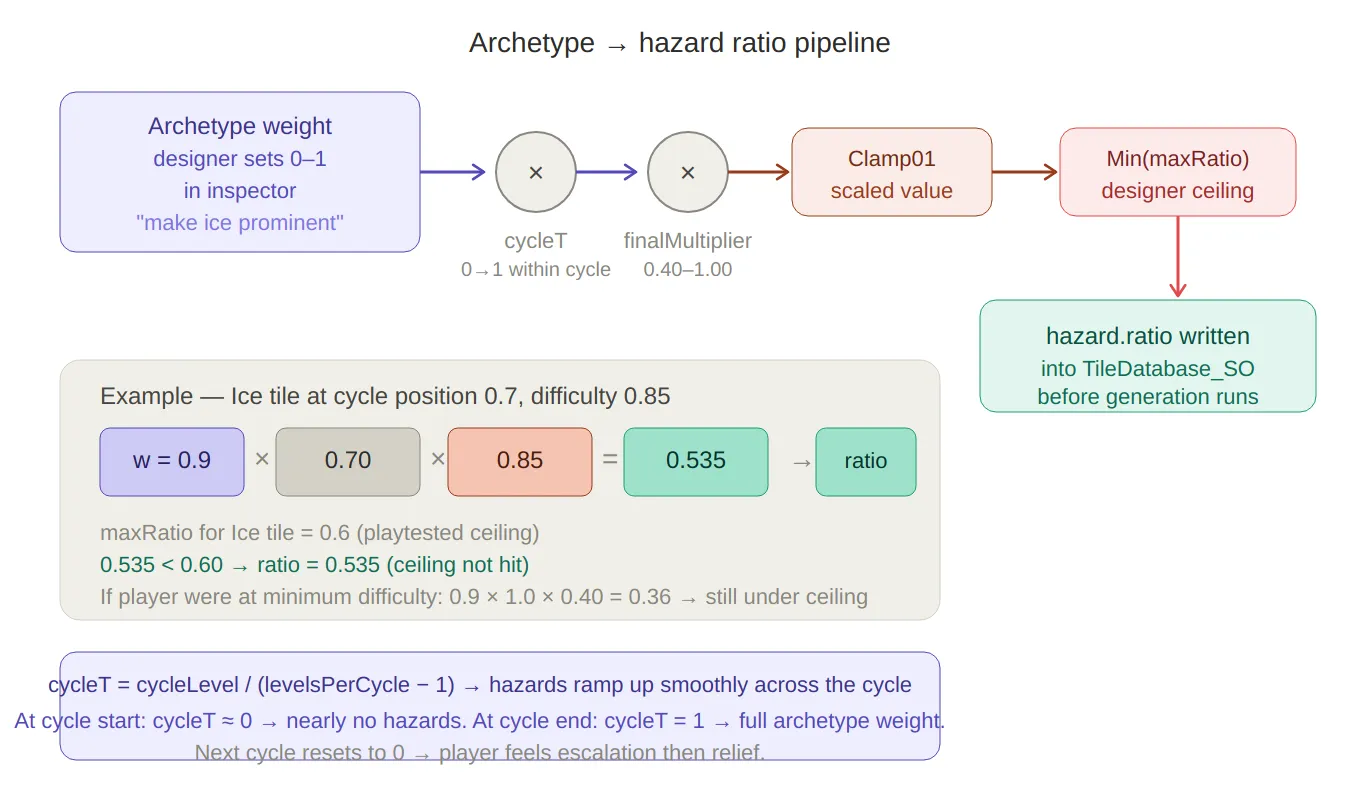
Archetype → ratio pipeline — traces how a designer’s intent (weight = 0.9) flows through cycleT and finalMultiplier, gets clamped, then hits the maxRatio ceiling before being written into the tile asset. A worked numeric example (Ice tile, cycleT = 0.7, difficulty 0.85 → ratio 0.535) makes the formula concrete.
The Config and State Layer
GeneratorParameters_SO — Base Configuration
GeneratorParameters_SO holds all the parameters the generator needs that don’t
come from the progression system:
// GeneratorParameters_SO.cs
public class GeneratorParameters_SO : ScriptableObject
{
    public int gridWidth  = 10;
    public int gridHeight = 10;
    public bool randomEnd = true;
    public Vector2Int fixedEnd;
    public int endMaxHeightPercent = 20;
    public int inputSeed = -1;           // -1 = random per level
    public TileDatabase_SO tileDatabase_SO;
    [Range(0, 20)] public int starCount = 3;
    [Range(1, 10)] public int minStarDistance = 2;
}
At runtime, LevelManager patches this asset’s fields with values computed by
RuntimeLevelProgression before passing it to the generator — treating the SO as
a mutable parameter bag:
// LevelManager.cs — GenerateRuntimeLevel()
baseParameters.gridWidth       = runtimeParams.width;
baseParameters.gridHeight      = runtimeParams.height;
baseParameters.tileDatabase_SO = runtimeParams.tileDatabase_SO;
baseParameters.minStarDistance = runtimeParams.minStarDistance;
baseParameters.inputSeed       = -1; // always random for runtime levels
This means the SO’s inspector values act as design-time defaults — useful for prototyping and editor testing — while the runtime always overwrites them with the computed values before generation.
GlobalDifficultyState_SO — Persistent Cross-Session State
The difficulty debt that accumulates as the player struggles is stored in a dedicated ScriptableObject, not serialized per-scene:
// GlobalDifficultyState_SO.cs
public class GlobalDifficultyState_SO : ScriptableObject
{
    public float difficultyDebt;   // 0 → no easing, 1 → max easing (20% reduction)
    public int remainingLevels;    // countdown to debt expiry
}
Using a ScriptableObject here means the debt value survives scene transitions automatically without any explicit save/load logic. It also makes the current debt directly inspectable in the Unity editor during playtesting — invaluable when validating that the difficulty curve is behaving as expected.
LevelDatabase_SO — Pre-Authored Level Registry
For tutorial levels and early handcrafted content, the LevelDatabase_SO holds an ordered
list of LevelData_SO records. LevelManager checks this first on every level load,
falling through to the procedural generator only if no authored level exists:
// LevelDatabase_SO.cs
public class LevelDatabase_SO : ScriptableObject
{
    public List<LevelData_SO> levels = new List<LevelData_SO>();

    public LevelData_SO GetLevelDataAtIndex(int index)
        => levels.Find(level => level.index == index);

    public void SaveLevelData(LevelData_SO data)
    {
        int existingIndex = levels.FindIndex(l => l.index == data.index);
        if (existingIndex >= 0) levels[existingIndex] = data; // override
        else                    levels.Add(data);

        levels = levels.OrderBy(level => level.index).ToList(); // keep sorted
    }
}
The database is sorted by index on every save, so GetLevelDataAtIndex using
List.Find is always searching an ordered list — a binary search could replace
this for very large databases, but at tutorial-scale sizes it is negligible.
The Editor Window — PathGeneratorWindow
All of this ScriptableObject infrastructure comes together in a custom editor window that lets me generate, preview, hand-paint, and save levels without entering play mode.
| WIndow | Diagram |
|---|---|
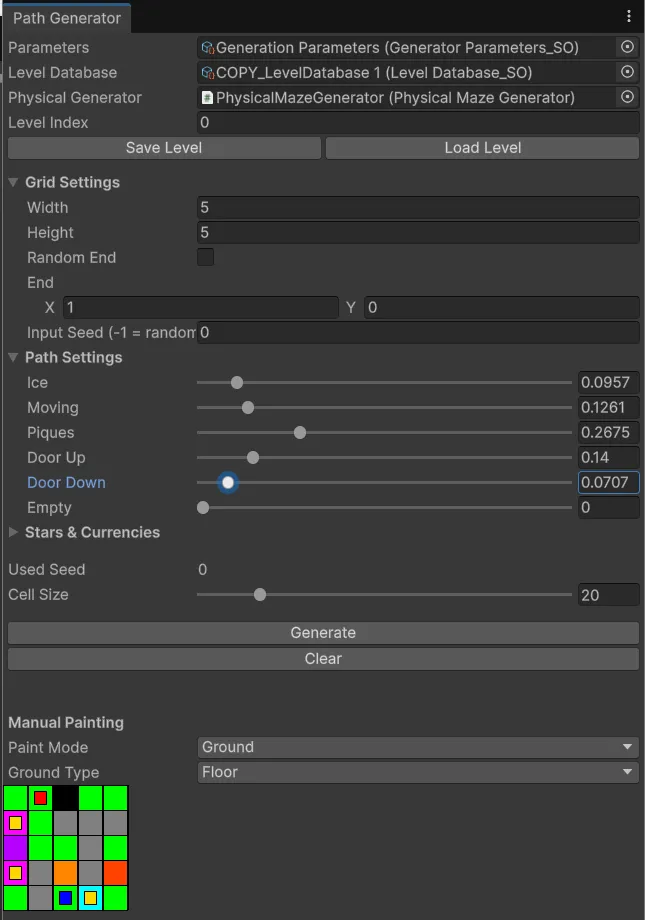 | 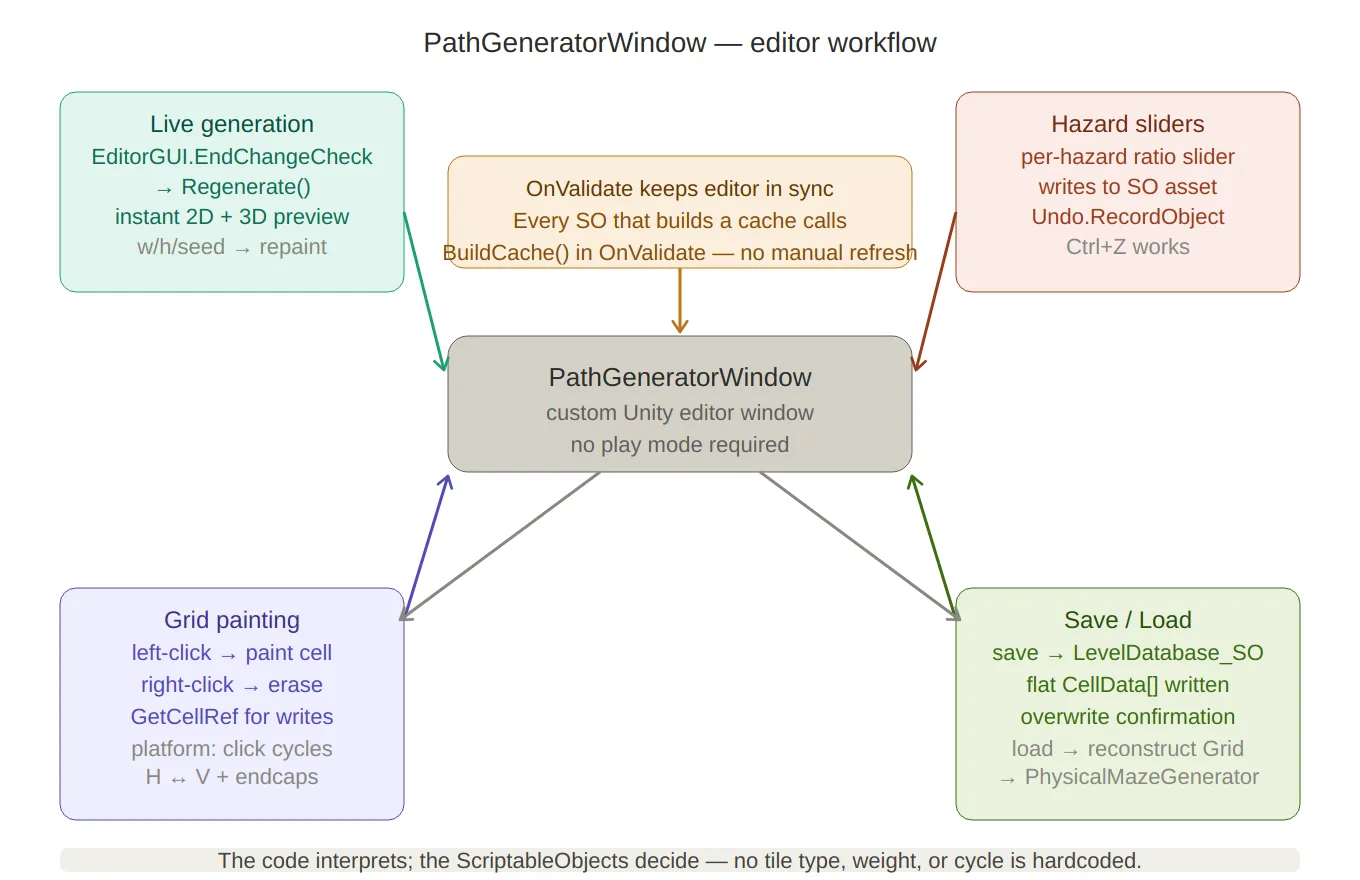 |
Editor window workflow — the four capabilities of PathGeneratorWindow arranged around the central window node: live generation (any setting change triggers instant regeneration), hazard sliders (write to SO assets with undo support), grid painting (ref writes with platform orientation cycling), and save/load (flattening to LevelDatabase_SO and reconstructing for scene preview). The OnValidate() cache-rebuild note sits at the top.
The window has four main capabilities:
1 — Live Generation with Instant Preview
Any change to grid settings triggers an immediate regeneration:
// PathGeneratorWindow.cs
private void DrawGridSettings()
{
    EditorGUI.BeginChangeCheck();
    parameters.gridWidth  = EditorGUILayout.IntField("Width", parameters.gridWidth);
    parameters.gridHeight = EditorGUILayout.IntField("Height", parameters.gridHeight);
    // … more fields …
    if (EditorGUI.EndChangeCheck())
        Regenerate(); // generate + repaint immediately
}

private void Regenerate()
{
    grid = PxP.PCG.Generator.GenerateMaze(levelIndex, parameters, out usedSeed);
    physicalGenerator?.Generate(grid); // also updates the 3D scene view
    Repaint();
}
2 — Per-Hazard Ratio Sliders
Each hazard tile in the TileDatabase_SO gets its own slider in the editor.
Dragging a slider writes directly to the SO asset and triggers a regeneration,
so the effect on level layout is visible immediately:
// PathGeneratorWindow.cs — DrawPathSettings()
foreach (var hazard in db.HazardTiles)
{
    Undo.RecordObject(hazard, "Modify Hazard Ratio");
    hazard.ratio = EditorGUILayout.Slider(
        ObjectNames.NicifyVariableName(hazard.name),
        hazard.ratio, 0f, 1f);
}

if (EditorGUI.EndChangeCheck())
{
    foreach (var hazard in db.HazardTiles)
        EditorUtility.SetDirty(hazard); // persist slider values to disk
    Regenerate();
}
Undo.RecordObject registers each change with Unity’s undo stack, so
Ctrl+Z works as expected during design sessions.
3 — Manual Grid Painting
For hand-authored content, the editor renders a 2D pixel-art view of the current grid and supports left-click to paint and right-click to erase:
// PathGeneratorWindow.cs — HandleGridMouseInput()
ref CellData cell = ref grid.GetCellRef(x, y);

if (e.button == 0) // left click → paint
{
    switch (paintMode)
    {
        case PaintMode.Ground:
            cell.isEmpty = false;
            cell.ground  = selectedGround;
            break;
        case PaintMode.Overlay:
            if (!cell.isEmpty)
                cell.overlay = selectedOverlay;
            break;
    }
}

if (e.button == 1) // right click → erase (overlay first, then wall)
{
    if (cell.overlay != OverlayType.None) cell.overlay = OverlayType.None;
    else                                  cell.isEmpty  = true;
}
Moving platforms get special treatment: clicking a platform tile cycles its
orientation between horizontal and vertical, and automatically paints or clears the
PlatformSide end-cap cells on either side.
4 — Save and Load
A finished level is saved into the LevelDatabase_SO with a confirmation dialog
if an existing level at that index would be overwritten:
// PathGeneratorWindow.cs — SaveCurrentLevel()
data.gridData = new CellData[width * height];
for (int y = 0; y < height; y++)
    for (int x = 0; x < width; x++)
        data.gridData[y * width + x] = grid.GetCellRef(x, y);

levelDatabase.SaveLevelData(data);
EditorUtility.SetDirty(levelDatabase);
AssetDatabase.SaveAssets();
Loading reconstructs the Grid from the flattened array and feeds it straight
into the PhysicalMazeGenerator to visualise in the scene:
// PathGeneratorWindow.cs — LoadLevel()
grid = new Grid(data.gridWidth, data.gridHeight);
for (int y = 0; y < data.gridHeight; y++)
    for (int x = 0; x < data.gridWidth; x++)
        grid.GetCellRef(x, y) = data.gridData[y * data.gridWidth + x];

physicalGenerator?.Generate(grid);
Design Principles
A few rules held throughout the design of this system:
The code interprets; the ScriptableObjects decide. No tile type, archetype name,
hazard weight, or cycle structure is hardcoded. Adding a new hazard type — say, a
conveyor belt — requires a new HazardTileDefinition_SO asset and a prefab, not a
code change.
Runtime state that needs to survive scenes goes into a ScriptableObject. The
GlobalDifficultyState_SO is the clearest example — debt state needs to persist
across the menu scene and the game scene, and storing it in a SO costs nothing
compared to wiring a DontDestroyOnLoad object or writing a custom serializer.
OnValidate keeps the editor in sync. Every SO that builds a cache does so in
OnValidate as well as OnEnable, so any inspector edit immediately propagates
through the system without a play-mode cycle.
maxRatio is the designer’s veto. The adaptive difficulty system can freely modulate hazard density between sessions — but it can never push a hazard above the ceiling the designer set during playtesting. The cap is baked into the asset, not into a conditional in the runtime code.
Summary
| Asset | Purpose |
|---|---|
TileDefinition_SO | Floor tile: prefab + walkability rules |
HazardTileDefinition_SO | Hazard tile: adds ratio, maxRatio, placement constraints |
OverlayDefinition_SO | Overlay: prefab + y-offset per type |
TileDatabase_SO | Lookup hub; runtime O(1) dictionaries built from inspector lists |
LevelArchetypeData_SO | Designer-authored hazard composition for a level type |
LevelCycleDefinition | Named group of archetypes for one progression cycle |
LevelCycleProgression_SO | Ordered cycle sequence + recovery archetype |
GeneratorParameters_SO | Base config, patched at runtime by the difficulty engine |
GlobalDifficultyState_SO | Cross-scene persistent difficulty debt |
LevelDatabase_SO | Registry of pre-authored levels, checked before PCG runs |
PathGeneratorWindow | Custom editor: generate, preview, paint, save/load |