MarbleMaze: Deep Dive — Timed Hazard Systems & Environment
Every tile hazard in MarbleMaze has two jobs: look good and not be frustrating. Looking good means smooth, readable motion. Not being frustrating means the player can always tell when it’s safe to cross. This post covers the shared interface that makes both properties consistent across every hazard type, the AnimationCurve-driven state machines behind each one, and everything else the environment does to the marble.
The ITimedHazard Interface
All three active hazard types — flapping doors, moving platforms, and spikes — implement the same interface:
// ITimedHazard.cs
public interface ITimedHazard
{
    void SetState(bool isInverted); // initialise to a phase offset
    float CycleDuration { get; }    // full open+close cycle in seconds
    bool IsSafe();                  // is it safe to cross right now?
}
Three methods, three distinct purposes:
SetState is called once at spawn time by PhysicalMazeGenerator. The isInverted
flag offsets the hazard to the midpoint of its cycle — used to prevent every hazard on a
level starting in the same phase simultaneously.
CycleDuration exposes the total loop time so external systems (audio cues, AI) can
reason about timing without inspecting internals.
IsSafe lets any code — the player, a power-up, an AI navigator — ask whether the
hazard is currently passable, again without knowing its internal state.
Checkerboard Phase Assignment
The phase offset is assigned by PhysicalMazeGenerator using a bitwise parity check on
the cell’s grid coordinates:
// PhysicalMazeGenerator.cs — SpawnGround()
if (ground.TryGetComponent<ITimedHazard>(out var hazard))
{
    bool isInverted = ((x + y) & 1) == 1;
    hazard.SetState(isInverted);
}
(x + y) & 1 is the parity of the coordinate sum — 0 for even, 1 for odd. On a grid,
adjacent cells always have opposite parities, so every neighbouring hazard starts in the
opposite phase. The result: hazards naturally alternate without any explicit coordination
between instances.
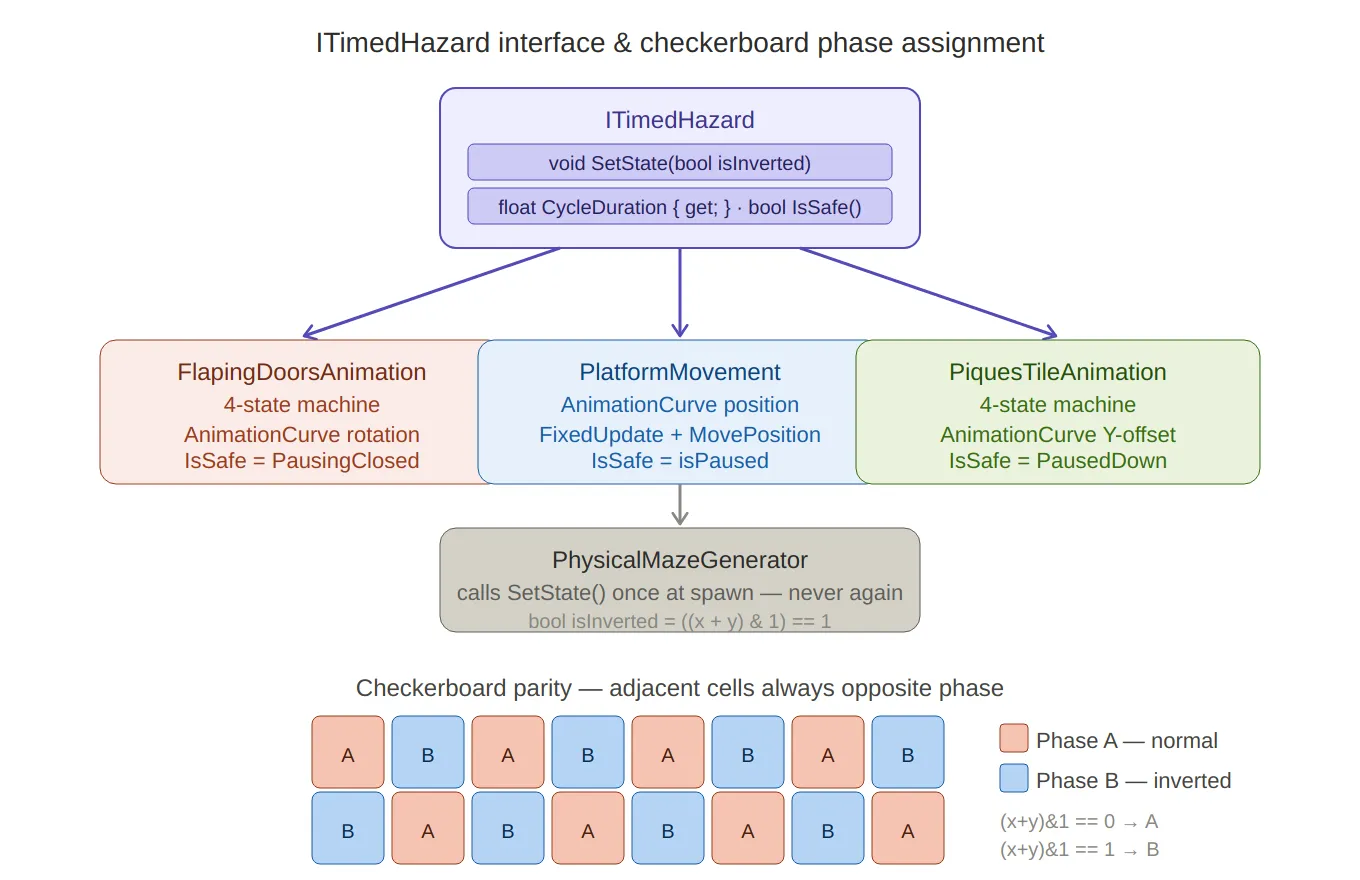
ITimedHazard + checkerboard — the interface sits at the top with its three methods,
branching down to all three implementors (doors, platforms, spikes) with their key characteristics.
Below, the checkerboard grid renders visually as alternating coral (Phase A) and blue (Phase B) cells,
making the (x+y)&1 parity trick immediately obvious — adjacent cells are always the opposite colour.
Flapping Doors
The flapping door is the most complex hazard. It has four distinct states and two independent moving parts — a left and right door panel that mirror each other’s rotation.
The State Machine
// FlappingDoors.cs
public enum DoorState { Opening, PausingOpen, Closing, PausingClosed }

private DoorState state = DoorState.Opening;
private float stateTimer;
Update increments stateTimer every frame and dispatches to state-specific logic:
private void Update()
{
    stateTimer += Time.deltaTime;

    switch (state)
    {
        case DoorState.Opening:
            if (!isOpening) { OnDoorOpening?.Invoke(); isOpening = true; }
            Animate(openCurve, openDuration, DoorState.PausingOpen);
            break;

        case DoorState.Closing:
            isOpening = false;
            Animate(closeCurve, closeDuration, DoorState.PausingClosed);
            break;

        case DoorState.PausingOpen:
            if (stateTimer >= openPauseDuration) NextState();
            break;

        case DoorState.PausingClosed:
            if (stateTimer >= closePauseDuration) { OnPauseEnded?.Invoke(); NextState(); }
            break;
    }
}
NextState uses a switch expression to advance only the two pause states — the animated
states (Opening, Closing) advance themselves inside Animate when t >= 1:
private void NextState()
{
    stateTimer = 0f;
    state = state switch
    {
        DoorState.PausingOpen   => DoorState.Closing,
        DoorState.PausingClosed => DoorState.Opening,
        _                       => state
    };
}
AnimationCurve-Driven Rotation
The actual motion is evaluated from an AnimationCurve asset — not a hardcoded
lerp. This means the designer can shape the easing entirely in the inspector:
slow-in fast-out, bounce, anticipation — any curve Unity’s editor can express:
private void Animate(AnimationCurve curve, float duration, DoorState next)
{
    float t     = Mathf.Clamp01(stateTimer / duration);
    float value = curve.Evaluate(t);

    leftDoor.localRotation  = leftClosedRotation  * Quaternion.Euler(0f, 0f,  value * flapAngle);
    rightDoor.localRotation = rightClosedRotation * Quaternion.Euler(0f, 0f, -value * flapAngle);

    if (t >= 1f) { state = next; stateTimer = 0f; }
}
Both doors rotate symmetrically from their closed positions — left door by +flapAngle,
right door by -flapAngle. Pre-caching leftClosedRotation and rightClosedRotation
in Start means the rotation is always expressed relative to the designer-placed
starting orientation, not accumulated over frames.
IsSafe returns true only when the doors are fully closed and stationary:
public bool IsSafe() => state == DoorState.PausingClosed;

public float CycleDuration =>
    openDuration + openPauseDuration + closeDuration + closePauseDuration;
Phase Initialisation
SetState places the door at the midpoint of its cycle when inverted:
public void SetState(bool isInverted)
{
    if (isInverted) { state = DoorState.Closing; stateTimer = CycleDuration / 2; }
    else            { state = DoorState.Opening; }
}
Starting at CycleDuration / 2 with the timer already advanced means the door
effectively begins halfway through its second half — interleaving cleanly with
its non-inverted neighbours.
DoorAngularPush — Physics Interaction
When the player marble is caught between a closing door, a separate DoorAngularPush
component applies a radial impulse force scaled by proximity to the door’s hinge:
// DoorAngularPush.cs — OnCollisionStay
if (doorsAnimation.State == FlapingDoorsAnimation.DoorState.Opening &&
    !hasCollided && !otherDoor.hasCollided)
{
    float distanceFromCenter = Mathf.Abs(playerPos.x - parentPos.x);
    float normalized = 1f - Mathf.Clamp01(distanceFromCenter / maxEffectiveDistance);
    float direction  = Mathf.Sign(playerPos.x - parentPos.x);

    Vector3 force = new Vector3(
        direction * pushForce * normalized,
        pushForce * normalized,
        0f
    );

    collision.rigidbody.AddForce(force, ForceMode.Impulse);
    hasCollided = true;
}
normalized is the inverse of normalised distance — 1.0 at the centre, 0.0 at
maxEffectiveDistance. A marble sitting directly under the hinge gets the full push;
one at the edge gets almost none. The hasCollided flag ensures only one impulse
fires per open cycle; it resets via the OnPauseEnded event from the animation:
private void OnEnable()  => doorsAnimation.OnPauseEnded += EnableCollision;
private void OnDisable() => doorsAnimation.OnPauseEnded -= EnableCollision;

private void EnableCollision() => hasCollided = false;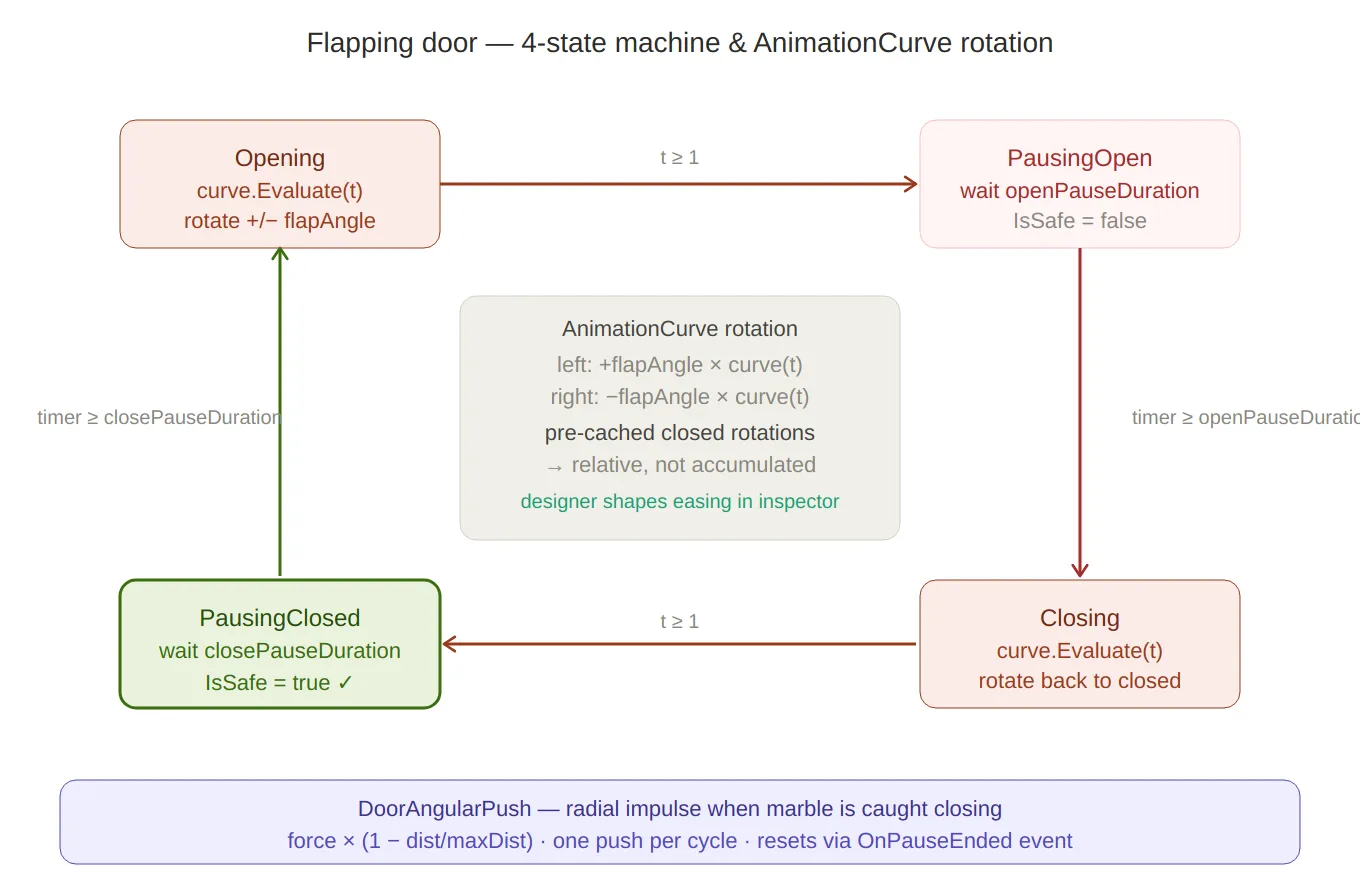
Door state machine — the four states arranged in a clockwise loop (Opening → PausingOpen → Closing → PausingClosed),
with transition labels on each arrow. The centre panel explains the AnimationCurve rotation math — pre-cached closed
rotations, mirrored ±flapAngle, relative not accumulated. IsSafe = true is highlighted in green only on PausingClosed.
The DoorAngularPush formula sits at the bottom.
Moving Platforms
Platforms use the same ITimedHazard interface and the same AnimationCurve pattern,
but applied to position rather than rotation — and running in FixedUpdate to stay
in sync with the physics engine.
// PlatformMovement.cs
[RequireComponent(typeof(Rigidbody))]
public class PlatformMovement : MonoBehaviour
{
    [SerializeField] private AnimationCurve movementCurve; // 0–1 normalised offset
    [SerializeField] private float cycleDuration   = 4f;
    [SerializeField] private float movementAmplitude = 3f;
    [SerializeField] private float pauseDuration   = 0.25f;

    public event Action<bool> OnPlatformActive; // true = moving, false = paused
Awake sets the Rigidbody to Interpolate mode — essential for smooth visual
motion when the physics tick rate is lower than the render rate:
private void Awake()
{
    rb = GetComponent<Rigidbody>();
    rb.isKinematic = true;
    rb.interpolation = RigidbodyInterpolation.Interpolate;
}
The platform’s starting position is offset by movementAmplitude so the animation
curve travels the full 2 × amplitude range symmetrically:
private void Start()
{
    startPosition = rb.position;
    if (isHorizonal) startPosition.x -= movementAmplitude;
    else             startPosition.z -= movementAmplitude;
    rb.position = startPosition;
}
Curve Evaluation and Keyframe Pause Detection
Every FixedUpdate, the timer drives a normalised t into movementCurve.Evaluate.
After applying the position, a pass over the curve’s keyframes checks whether t is
within 1ms of any keyframe time — if so, the platform pauses:
private void FixedUpdate()
{
    if (isPaused)
    {
        pauseTimer -= Time.fixedDeltaTime;
        if (pauseTimer <= 0f) { isPaused = false; OnPlatformActive?.Invoke(true); }
        else return;
    }

    timer += Time.fixedDeltaTime;
    float t = (timer % cycleDuration) / cycleDuration;

    float normalizedOffset = Mathf.Clamp01(movementCurve.Evaluate(t));

    Vector3 targetPosition = startPosition;
    if (isHorizonal) targetPosition.x += normalizedOffset * movementAmplitude * 2;
    else             targetPosition.z += normalizedOffset * movementAmplitude * 2;

    rb.MovePosition(targetPosition);

    foreach (Keyframe key in movementCurve.keys)
    {
        if (Mathf.Abs(t - key.time) < 0.001f)
        {
            isPaused = true;
            pauseTimer = pauseDuration;
            OnPlatformActive?.Invoke(false);
            break;
        }
    }
}
The 0.001f threshold translates to about 1ms of cycle time — tight enough to only
fire at the keyframe, loose enough to not miss it at any physics tick rate. Keyframes
at t = 0 and t = 1 (start and end of travel) produce the pauses the designer
placed in the inspector curve.
rb.MovePosition is used instead of setting transform.position directly — this
keeps the Rigidbody in the physics pipeline and allows the marble to be carried
correctly when standing on the platform.
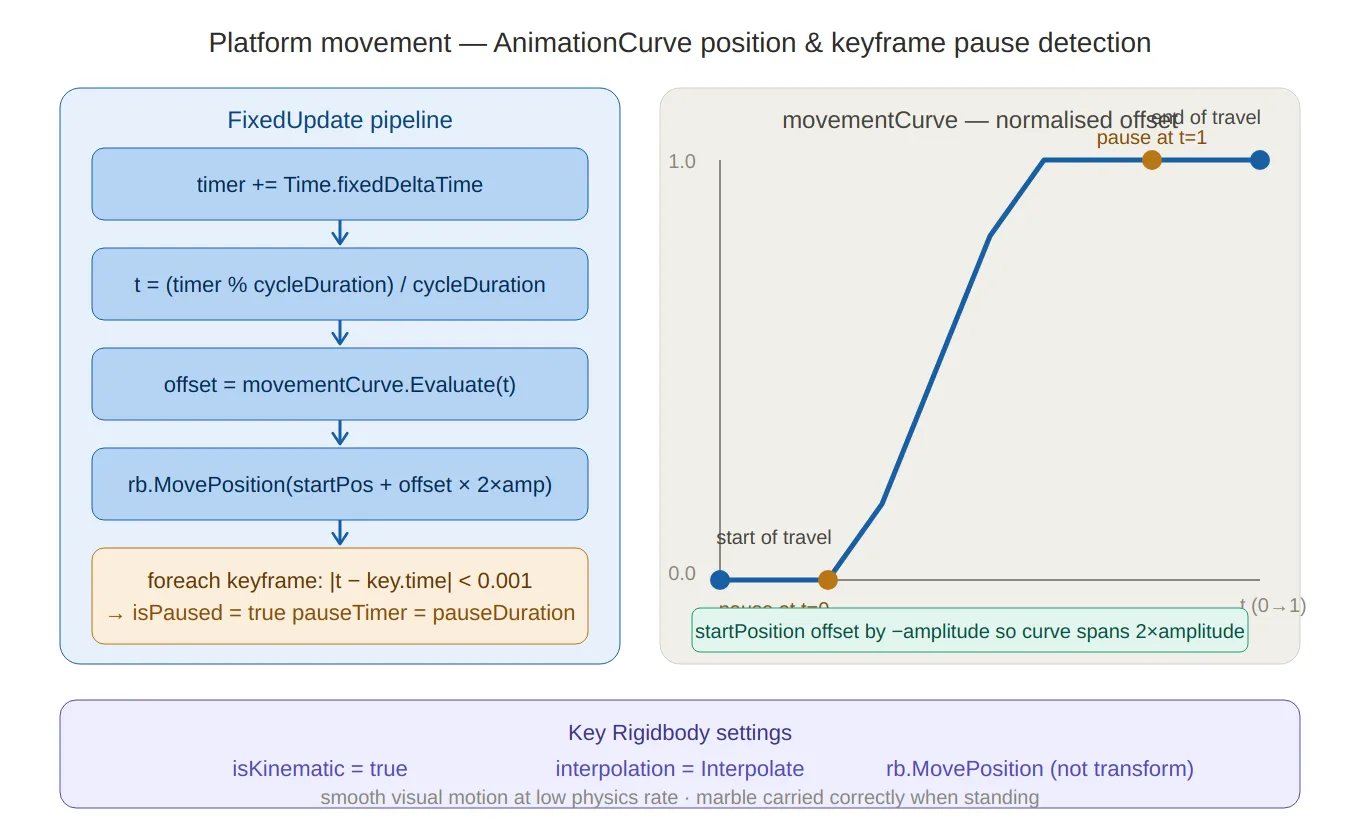
Platform movement — left side traces the five-step FixedUpdate pipeline (timer → t → curve evaluate → MovePosition →
keyframe pause check), right side shows an annotated S-curve chart with the 0.001 pause-detection threshold marked at
t=0 and t=1. The three key Rigidbody settings (isKinematic, Interpolate, MovePosition) are called out at the bottom.
Spikes (Piques)
Spikes follow the same four-state pattern as doors, applied to vertical translation instead of rotation:
// PiquesTileAnimation.cs
private enum PiquesState { Rising, PausedUp, Lowering, PausedDown }

private void Animate(AnimationCurve curve, float duration, PiquesState next)
{
    float t     = Mathf.Clamp01(stateTimer / duration);
    float value = curve.Evaluate(t);

    piques.localPosition = piqueOriginalPosition + Vector3.up * piquesYOffset * value;

    if (t >= 1f) { state = next; stateTimer = 0f; }
}

public bool IsSafe() => state == PiquesState.PausedDown;

public void SetState(bool isInverted)
{
    if (isInverted) { state = PiquesState.Lowering; stateTimer = CycleDuration / 2; }
    else            { state = PiquesState.Rising; }
}
piqueOriginalPosition is cached at Start, so the spike’s resting position can
be freely placed in the inspector without affecting the animation math. The spikes
are safe only while fully retracted (PausedDown), giving the player a clear
visual window — when they’re down, cross; when they start rising, don’t.
Death Triggers
DeadZone — Fall Death
DeadZone handles the standard fall-off-the-edge scenario using OnCollisionEnter.
It checks GameState.Playing first — so death can’t fire during a pause or cutscene —
and guards against double-processing with the IsDying state check:
// DeadZone.cs
private void OnCollisionEnter(Collision collision)
{
    if (GameStateManager.Instance.CurrentGameState != GameState.Playing) return;
    if (!collision.gameObject.CompareTag("Player")) return;

    if (playerMovement.State == PlayerState.IsDying) return;
    playerMovement.SetState(PlayerState.IsDying);

    LifeManager.Instance.RemoveLife();

    if (LifeManager.Instance.CurrentLife > 0)
        playerMovement.ReplacePlayer();   // respawn
    else
    {
        GameStateManager.Instance.SetState(GameState.WaitingForContinue);
        continuePannel.SetActive(true);
        playerMovement.ReplacePlayer();
    }
}
The state guard (IsDying) prevents the same death from being processed twice if the
marble clips multiple colliders in the same frame — a common problem with physics-based
death zones.
PiquesDeadZone — Spike Death with Impulse
Spikes use a different death zone because they should feel more violent than a simple
fall. Instead of instantly respawning, PiquesDeadZone applies a radial impulse that
launches the marble away from the spike tile, then waits before respawning:
// PiquesDeadZone.cs — OnTriggerEnter
playerVisualEffects.ShouldBlink(); // start the blink effect

Vector3 projectionDir = (collision.transform.position - transform.position).normalized;
playerRigidbody.AddForce(
    new Vector3(
        projectionDir.x * radialForce,
        projectionForce,            // upward component
        projectionDir.z * radialForce
    ),
    ForceMode.Impulse
);

StartCoroutine(DeathSequenceAfterDelay(deathDelay));
private IEnumerator DeathSequenceAfterDelay(float delay, bool isLastLife = false)
{
yield return new WaitForSeconds(delay); // let physics play out
yield return new WaitForFixedUpdate(); // sync with physics step
if (isLastLife)
{
GameStateManager.Instance.SetState(GameState.WaitingForContinue);
continuePannel.SetActive(true);
}
playerMovement.ReplacePlayer();
}The WaitForFixedUpdate after the delay ensures the respawn position change happens
cleanly in a physics frame, not mid-update — avoiding a one-frame jitter where the
marble briefly appears at its old position.
Star Trigger
Stars are the simplest trigger in the game — three lines and they do everything they need:
// StarTrigger.cs
private void OnTriggerEnter(Collider other)
{
    if (!other.CompareTag("Player") &&
        !other.CompareTag("Ufo") &&
        !other.CompareTag("Rocket")) return;

    LevelManager.Instance?.IncreaseStarCount();
    VibrationManager.Instance?.MultiPop(3);    // 3-pulse haptic feedback
    AudioManager.Instance?.PlayStarSound();
    gameObject.SetActive(false);               // self-deactivate
}
Accepting all three player tags (Player, Ufo, Rocket) means stars can be collected
regardless of which power-up is active. SetActive(false) is used instead of Destroy
— cleaner for any future pooling system, and avoids the one-frame delay Destroy has
before the object actually disappears.
End Trigger — Level Completion Sequence
The level exit is a multi-phase coroutine that takes the marble through a cinematic sequence before transitioning to the end screen. Each phase has its own duration and easing function:
// EndTrigger.cs
private IEnumerator EndSequence(Transform player, Rigidbody rb)
{
    rb.isKinematic = true; // freeze physics for the sequence

    // Phase timings derived from a single animationDuration value
    float centerTime   = animationDuration * 0.10f;
    float levitateTime = animationDuration * 0.60f;
    float burstTime    = animationDuration * 0.30f;

    // ── 1. Snap to center of the exit tile ──
    yield return MoveOverTime(player, player.position, centerPos, centerTime, EaseInOut);

    // ── 2. Levitate: align upright, spin, rise ──
    StartCoroutine(RotateToUpright(player, alignTime)); // concurrent
    StartCoroutine(Spin(player, spinTime, 6f));         // concurrent
    StartRumble(spinTime);                              // camera shake + audio

    yield return MoveOverTime(player, levitateStart, levitateEnd, levitateTime, EaseOutSine);

    StopRumble();

    // ── 3. Burst upward ──
    PlayerCamera.SetCameraFollow(null); // detach camera
    rb.isKinematic = false;
    rb.linearVelocity = Vector3.zero;
    rb.AddForce(Vector3.up * burstForce, ForceMode.Impulse);
    PlayCometSound();

    yield return Spin(player, burstTime, 10f);

    // ── 4. Scene transition ──
    LevelManager.Instance.ProcessLevelData();
    SavingManager.Instance.SaveSession();
    SceneController.Instance.NewTransition()
        .Load(SceneDatabase.Slots.Content, SceneDatabase.Scenes.EndPannel)
        .Perform();
}
The levitate phase runs three coroutines concurrently: RotateToUpright (Slerp to
zero roll/pitch), Spin (continuous Y-axis rotation), and the main MoveOverTime
(vertical rise). yield return waits only on the MoveOverTime; the others run in
parallel until the rise completes naturally.
Custom easing functions are inline delegates rather than an external library:
private float EaseInOut(float t) => t * t * (3f - 2f * t);  // smoothstep
private float EaseOutSine(float t) => Mathf.Sin(t * Mathf.PI * 0.5f);
MoveOverTime takes the easing as a Func<float, float> parameter, so each phase
gets its own feel without duplicating the interpolation loop:
private IEnumerator MoveOverTime(
    Transform t, Vector3 from, Vector3 to,
    float duration, Func<float, float> ease)
{
    float elapsed = 0f;
    while (elapsed < duration)
    {
        t.position = Vector3.Lerp(from, to, ease(elapsed / duration));
        elapsed += Time.deltaTime;
        yield return null;
    }
    t.position = to;
}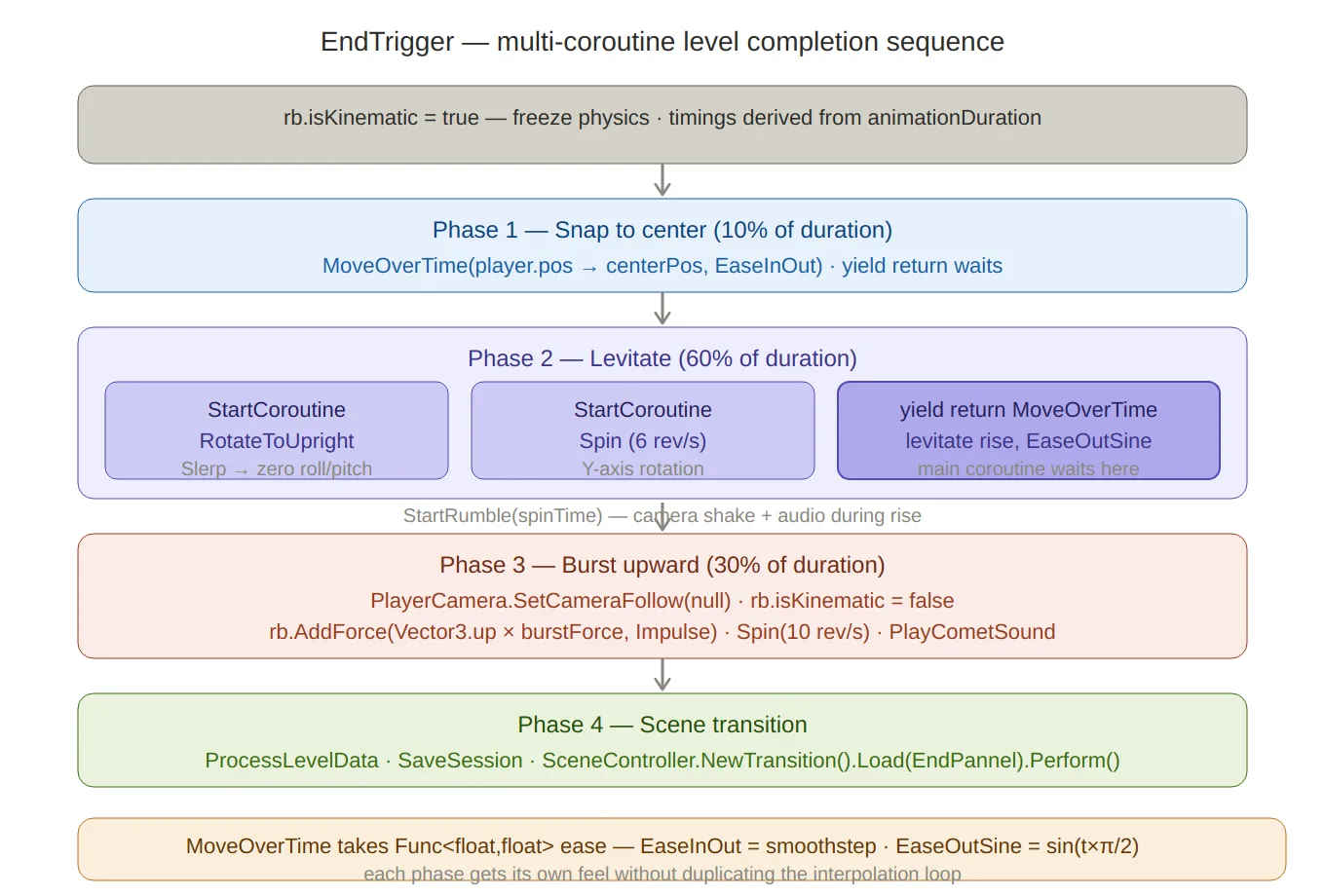
End trigger sequence — four sequential phases with timing percentages (10% / 60% / 30%), the concurrent coroutine
structure in Phase 2 clearly showing three StartCoroutine calls running in parallel while yield return MoveOverTime
waits on just the rise. The Func<float,float> easing injection pattern and both easing functions are noted at the bottom.
Summary
| Component | Technique | Key detail |
|---|---|---|
ITimedHazard | Interface | IsSafe() + SetState() + CycleDuration |
| Checkerboard phasing | (x + y) & 1 | Adjacent hazards always start in opposite phases |
FlapingDoorsAnimation | 4-state machine + AnimationCurve | Independent open/close curves; Quaternion.Euler mirrored on both doors |
DoorAngularPush | Distance-normalized impulse | One push per cycle; reset via OnPauseEnded event |
PlatformMovement | AnimationCurve position + FixedUpdate | 0.001f keyframe pause detection; rb.MovePosition for physics carry |
PiquesTileAnimation | 4-state machine + AnimationCurve | Y-offset translation; safe only during PausedDown |
DeadZone | OnCollisionEnter | IsDying state guard prevents double-kill |
PiquesDeadZone | Radial impulse + delayed respawn | WaitForFixedUpdate for clean physics-step respawn |
StarTrigger | OnTriggerEnter | Multi-tag, SetActive(false) not Destroy |
EndTrigger | Multi-coroutine sequence | Concurrent levitate phase; Func<float,float> easing injection |
The shared ITimedHazard interface is the architectural win here — PhysicalMazeGenerator
calls SetState through the interface at spawn time and never touches the hazards again.
The checkerboard parity trick means all that phase distribution happens in one line with no
runtime state to manage.