-
MarbleMaze: Deep Dive — Procedural Maze Generation with Kruskal's Algorithm
This is a deep dive into the procedural level generator behind MarbleMaze: Galactic Stars. Every level the player encounters is generated at runtime — no hand-crafted layouts, no level files. Each one is unique, yet fully reproducible from a single integer seed.
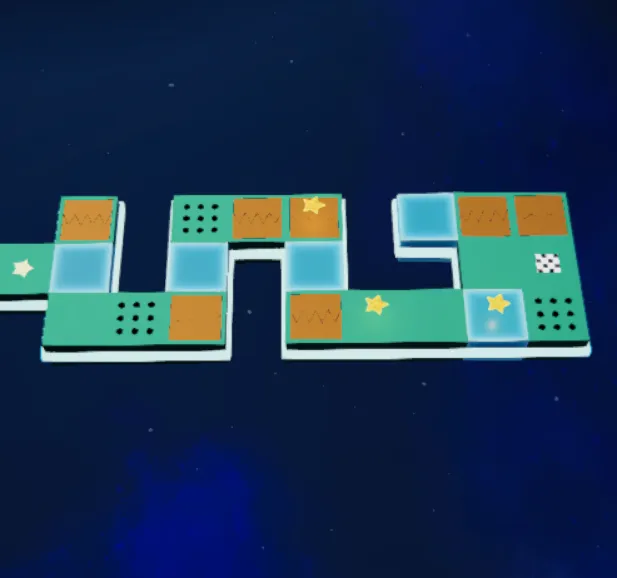 The four steps established for this generation are all described in this post.Read the full process below…
The Goal
The generator needs to produce a perfect maze — a grid of cells connected by passages where every cell is reachable and there are no loops. On top of that, it needs to:
- Place hazard tiles (ice, spikes, doors, moving platforms) in a way that feels hand-crafted
- Guarantee start and end positions
- Scatter collectible stars at meaningful distances from each other
- Do all of this deterministically from a single seed (the level index), so the same level always looks the same
The whole pipeline runs in four sequential steps, orchestrated by a single static entry point:
// Generator.cs
public static Grid GenerateMaze(int levelIndex, GeneratorParameters_SO p, out int usedSeed)
{
    usedSeed = levelIndex == -1
        ? (p.inputSeed == -1 ? Random.Range(int.MinValue, int.MaxValue) : p.inputSeed)
        : levelIndex;

    var rng = new System.Random(usedSeed);

    Grid grid = GridFactory.CreateWallGrid(p.gridWidth, p.gridHeight);

    // 1. Perfect maze
    var carved = MazeGenerator.GenerateKruskalMaze(p.gridWidth, p.gridHeight, rng);

    // 2. Start / End
    var start = GridUtils.GetStartPosition(grid, p);
    var end   = GridUtils.ResolveEndPosition(grid, p, rng);
    GridUtils.MarkStartAndEnd(grid, start, end);

    // 3. Tile rules
    MazeGenerator.ApplyMaze(grid, carved, p, rng);

    // 4. Stars
    StarPlacer.PlaceStars(grid, p, carved, start, end, rng);

    return grid;
}
Passing
levelIndexdirectly as the seed is the simplest possible reproducibility guarantee — regenerating level 42 will always produce the same maze.
Step 0 — The Grid & CellData
Before anything is generated,
GridFactory.CreateWallGridinitialises the grid with every cell marked as empty (a wall). Generation then works by carving passages through it.// GridFactory.cs public static Grid CreateWallGrid(int width, int height) { Grid grid = new Grid(width, height); for (int x = 0; x < width; x++) for (int y = 0; y < height; y++) grid.SetCell(x, y, new CellData { isEmpty = true, ground = GroundType.Floor }); return grid; }Each cell in the grid is a
CellDatastruct — a value type stored directly in a 2D array. No heap allocations during traversal, no GC pressure on mobile:// CoreData.cs [System.Serializable] public struct CellData { public bool isEmpty; // true = wall, false = walkable public GroundType ground; // Floor, Ice, Piques, MovingPlatform … public OverlayType overlay; // None, Start, End, Star public bool isEnd; public bool isHorizontal; // orientation flag for line hazards public bool requiresTwoSolidNeighbours; }The
Gridclass wrapsCellData[,]and exposes two accessor styles.GetCellreturns a copy (safe for reading), whileGetCellRefreturns arefto the struct for in-place mutation without boxing or a round-trip copy:public ref CellData GetCellRef(int x, int y) => ref cells[x, y];This pattern appears everywhere in the generator — every tile rule modifies cells through
refaccessors to keep the pipeline allocation-free.
Step 1 — Kruskal’s Algorithm for Perfect Mazes
Kruskal’s algorithm builds a minimum spanning tree of a graph. Applied to a grid, it builds a spanning tree of all cells — which is exactly what a perfect maze is: every cell connected, no loops, exactly one path between any two points.
The Even-Cell Trick
A key implementation detail: cells only live at even coordinates. A 10×10 grid has cells at
(0,0),(0,2),(2,0),(2,2)… and so on. The odd coordinates are the walls between cells.When two cells are connected by removing the wall between them, three positions become walkable:
- cell A (even, even)
- cell B (even, even)
- the wall between them — the midpoint
(A + B) / 2
This is the standard “cell + passage” encoding for grid mazes.
// MazeGenerator.cs public static HashSet<Vector2Int> GenerateKruskalMaze(int width, int height, System.Random rng) { // 1. Collect cells at even coordinates only var cells = new List<Vector2Int>(); for (int x = 0; x < width; x += 2) for (int y = 0; y < height; y += 2) cells.Add(new Vector2Int(x, y)); // 2. Build the edge list (connections between adjacent cells, 2 apart) var edges = new List<Edge>(); foreach (var c in cells) { TryAddEdge(c, Vector2Int.right * 2); TryAddEdge(c, Vector2Int.up * 2); } // 3. Shuffle edges for randomness GridUtils.Shuffle(edges, rng); // 4. Kruskal: union cells, carve passages for accepted edges var uf = new UnionFind<Vector2Int>(cells); var carved = new HashSet<Vector2Int>(); foreach (var e in edges) { if (!uf.Union(e.a, e.b)) continue; // already connected — skip carved.Add(e.a); // cell A carved.Add(e.b); // cell B carved.Add((e.a + e.b) / 2); // wall between them } return carved; }Unionreturnsfalsewhen the two cells already share a root — meaning connecting them would create a loop. By skipping those edges, Kruskal’s guarantees the result is loop-free.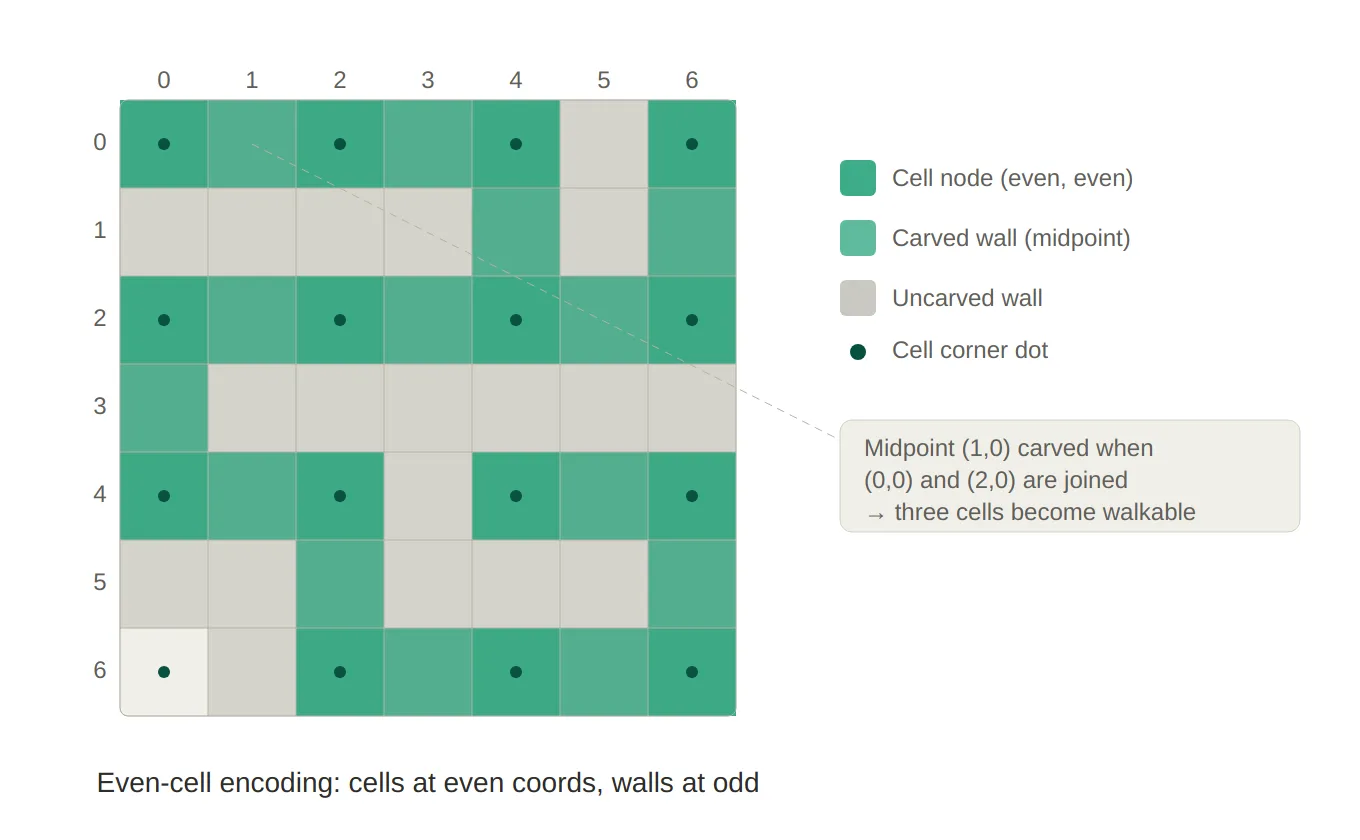
Grid & Kruskal’s — The even-cell encoding is shown as a 7×7 coordinate grid. Cell nodes sit at even coordinates (marked with dots), walls at odd ones. The teal path traces a sample spanning tree carved by the algorithm — notice how every connected passage lights up three tiles: cell A, cell B, and the midpoint wall between them.
Step 2 — Union-Find Data Structure
The correctness of Kruskal’s depends entirely on efficiently answering one question: “Are these two cells already connected?”
This is exactly the Union-Find (or Disjoint Set Union) data structure. I implemented it as a generic class so it can work with any comparable type —
Vector2Intin this case:// UnionFind.cs public class UnionFind<T> { private readonly Dictionary<T, T> parent; private readonly Dictionary<T, int> rank; public UnionFind(IEnumerable<T> nodes) { parent = new Dictionary<T, T>(); rank = new Dictionary<T, int>(); foreach (var n in nodes) { parent[n] = n; // each node is its own root initially rank[n] = 0; } } public T Find(T x) { if (!parent[x].Equals(x)) parent[x] = Find(parent[x]); // path compression return parent[x]; } public bool Union(T a, T b) { T rootA = Find(a); T rootB = Find(b); if (rootA.Equals(rootB)) return false; // same tree — would create a cycle // Union by rank: attach the shorter tree under the taller one if (rank[rootA] < rank[rootB]) parent[rootA] = rootB; else if (rank[rootA] > rank[rootB]) parent[rootB] = rootA; else { parent[rootB] = rootA; rank[rootA]++; } return true; } }Two classical optimisations are in play:
Path compression (in
Find): after traversing up to the root, every node along the path is re-pointed directly at the root. Future lookups on the same node take O(1).Union by rank (in
Union): the tree with the smaller depth is attached under the taller one, keeping trees balanced and preventing worst-case O(n) chains.Together these give O(α(n)) amortised per operation, where α is the inverse Ackermann function — effectively constant for any input size you’d encounter in practice.
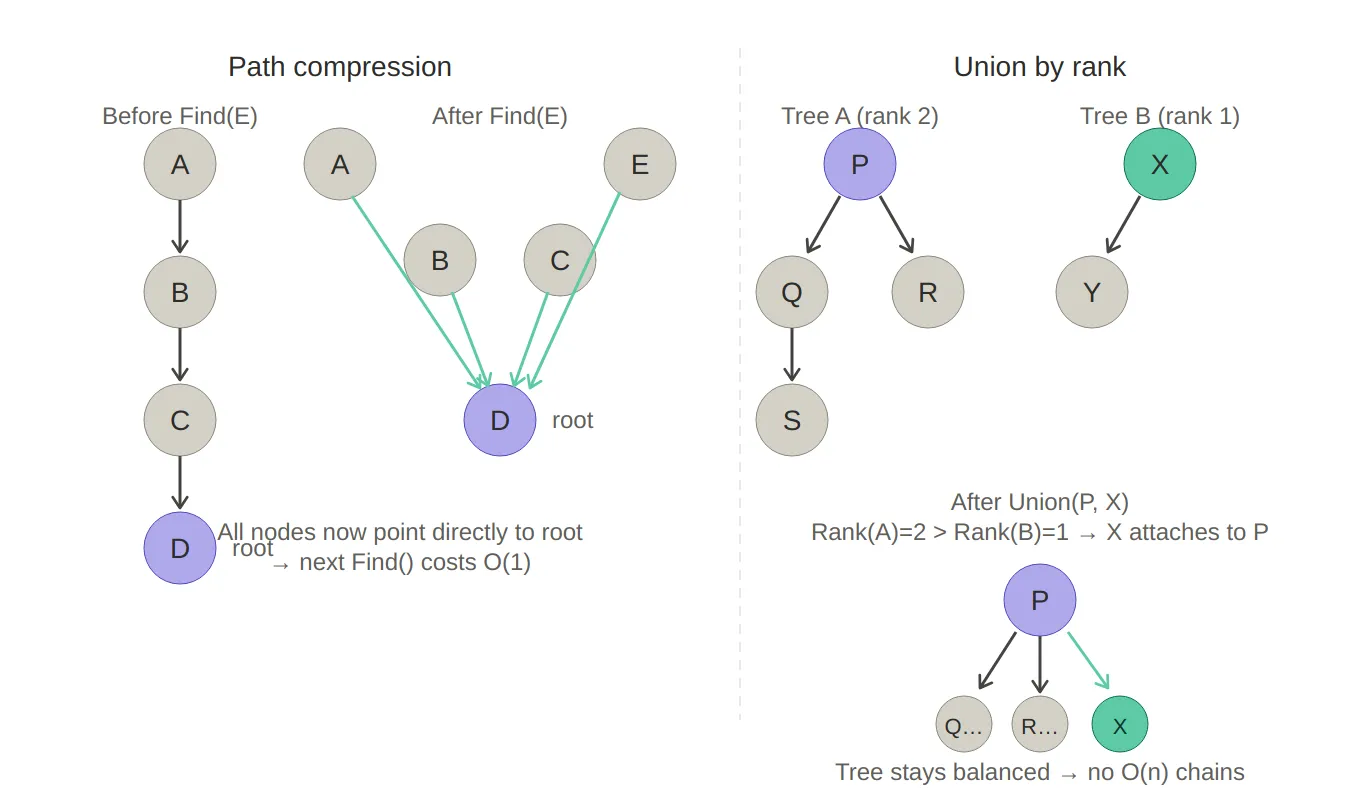
Union-Find — The left side shows path compression in action: a 4-deep chain (A→B→C→D) collapses to a flat star shape after a single Find(E), so every subsequent lookup is O(1). The right side shows union by rank: Tree B (rank 1) is attached under Tree A (rank 2) rather than the other way around, keeping the merged tree balanced.
Step 3 — Tile Decoration (3-Pass System)
The carved
HashSet<Vector2Int>from Kruskal’s only tells us which cells are walkable — it says nothing about what kind of floor tile each cell should be.MazeGenerator.ApplyMazeruns three passes in sequence, each adding a layer of tile variety with progressively stricter context requirements.Pass 1 — Base Tiles
Every carved cell gets a ground type via weighted random selection from the active hazard list. The weights are normalised at runtime so the ratios sum to at most 1.0 — any remainder becomes plain
Floor:private static void ApplyBaseTiles(Grid grid, HashSet<Vector2Int> carved, TileDatabase_SO db, System.Random rng) { var hazards = db.SimpleHazards.ToList(); foreach (var pos in carved) { ref var cell = ref grid.GetCellRef(pos); if (cell.overlay != OverlayType.None) continue; // don't overwrite Start/End cell.isEmpty = false; float total = hazards.Sum(h => h.ratio); float scale = Mathf.Min(1f, total) / total; // normalise to ≤ 1.0 double roll = rng.NextDouble(); float cumulative = 0f; foreach (var h in hazards) { cumulative += h.ratio * scale; if (roll < cumulative) { cell.ground = h.groundType; break; } } } }Pass 2 — Two-Solid-Neighbour Tiles
Some hazards (e.g. wall spikes) only make sense when the cell has at least two solid (non-empty) neighbours — otherwise they’d appear floating in mid-air. This pass collects all eligible candidates, shuffles them, then fills up to a ratio target:
private static bool IsValidTwoSolidPlacement(Grid grid, Vector2Int pos)
{
    int solidNeighbours = 0;
    foreach (var d in Directions4)
    {
        var n = pos + d;
        if (!grid.IsInside(n)) continue;
        var neighbor = grid.GetCell(n.x, n.y);

        // Reject if a neighbour is already a two-solid tile — prevents clustering
        if (neighbor.requiresTwoSolidNeighbours) return false;

        if (!neighbor.isEmpty) solidNeighbours++;
    }
    return solidNeighbours >= 2;
}
The anti-clustering check (
requiresTwoSolidNeighbours) prevents two of these tiles from sitting next to each other, which would look and play poorly.Pass 3 — Line Tiles (3-cell Hazards)
The last pass places 3-cell hazards (e.g. a moving platform with two edge pieces). These require three consecutive walkable cells in a row or column:
// Collect valid center positions for horizontal and vertical lines
if (x-1 >= 0 && x+1 < grid.Width &&
    IsWalkable(grid, x-1, y) && IsWalkable(grid, x, y) && IsWalkable(grid, x+1, y))
    candidates.Add((new Vector2Int(x, y), horizontal: true));
After placement, all three cells are recorded in a
bool[,] reservedarray to prevent overlapping lines from the same or subsequent passes:private static void ApplyLine(Grid grid, bool[,] reserved, (Vector2Int center, bool horizontal) c, HazardTileDefinition_SO hazard) { // Center cell gets the primary ground type ref var centerCell = ref grid.GetCellRef(c.center); centerCell.ground = hazard.groundType; centerCell.isHorizontal = c.horizontal; // Side cells get a different "edge" type (e.g. platform endcap) if (c.horizontal) { SetSide(grid, c.center.x - 1, c.center.y, hazard); SetSide(grid, c.center.x + 1, c.center.y, hazard); Reserve(reserved, c.center.x - 1, c.center.y, c.center.x, c.center.y, c.center.x + 1, c.center.y); } // ... vertical case mirrors this }This three-pass design — base → context-aware → structural — mirrors how a level designer would layer detail: first paint the floor, then add wall-hugging elements, then place the large set-pieces.
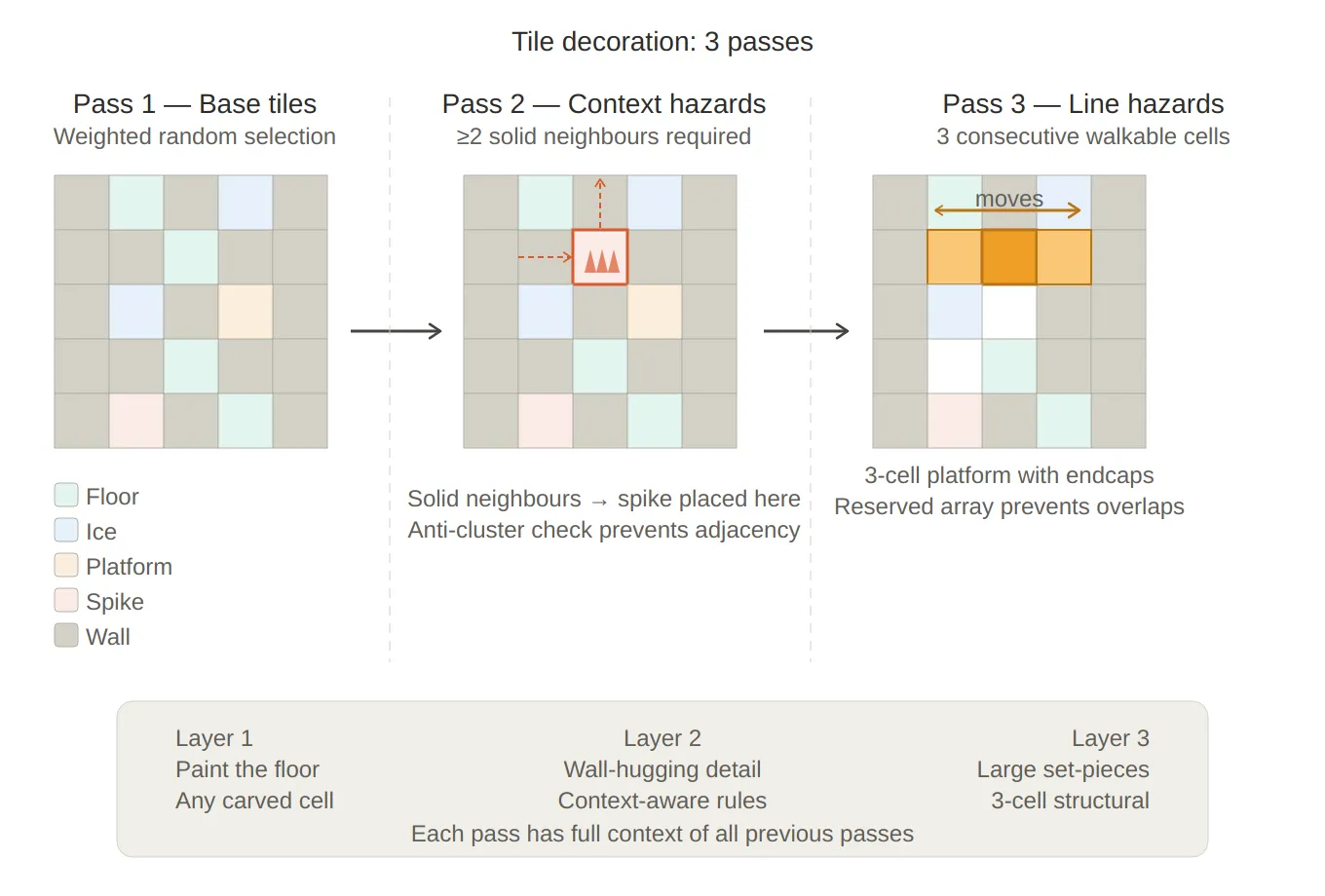
3-pass decoration — Each panel shows the same maze at a different stage. Pass 1 lays down random floor types. Pass 2 uses the neighbour context (the red arrows) to place a spike tile that has ≥2 solid neighbours. Pass 3 places a 3-cell moving platform across three consecutive walkable cells, with a reserved array preventing overlaps.
Step 4 — Star Placement
Stars use a two-pass placement strategy to balance the ideal spacing constraint against the reality that small or heavily decorated mazes might not have enough spread-out candidates.
public static void PlaceStars(Grid grid, GeneratorParameters_SO p,
    HashSet<Vector2Int> walkable, Vector2Int start, Vector2Int end, System.Random rng)
{
    var placed     = new List<Vector2Int>();
    var candidates = walkable.Where(c => c != start && c != end).ToList();
    GridUtils.Shuffle(candidates, rng);

    // Pass 1: strict — enforce minStarDistance between all placed stars
    foreach (var pos in candidates)
    {
        if (placed.Count >= p.starCount) break;
        if (grid.GetCell(pos.x, pos.y).overlay != OverlayType.None) continue;
        if (grid.GetCell(pos.x, pos.y).isEmpty) continue;
        if (grid.GetCell(pos.x, pos.y).requiresTwoSolidNeighbours) continue;
        if (placed.Any(s => Vector2Int.Distance(s, pos) < p.minStarDistance)) continue;

        grid.GetCellRef(pos.x, pos.y).overlay = OverlayType.Star;
        placed.Add(pos);
    }

    // Pass 2: relaxed — drop the distance constraint to fill the quota
    if (placed.Count < p.starCount)
    {
        foreach (var pos in candidates)
        {
            if (placed.Count >= p.starCount) break;
            if (grid.GetCellRef(pos.x, pos.y).overlay != OverlayType.None) continue;
            if (grid.GetCell(pos.x, pos.y).isEmpty) continue;
            if (grid.GetCell(pos.x, pos.y).requiresTwoSolidNeighbours) continue;
            if (placed.Contains(pos)) continue;

            grid.GetCellRef(pos.x, pos.y).overlay = OverlayType.Star;
            placed.Add(pos);
        }
    }
}
Stars also refuse to land on two-solid-neighbour tiles — those are already decorated with context-dependent hazards and would be confusing to navigate.
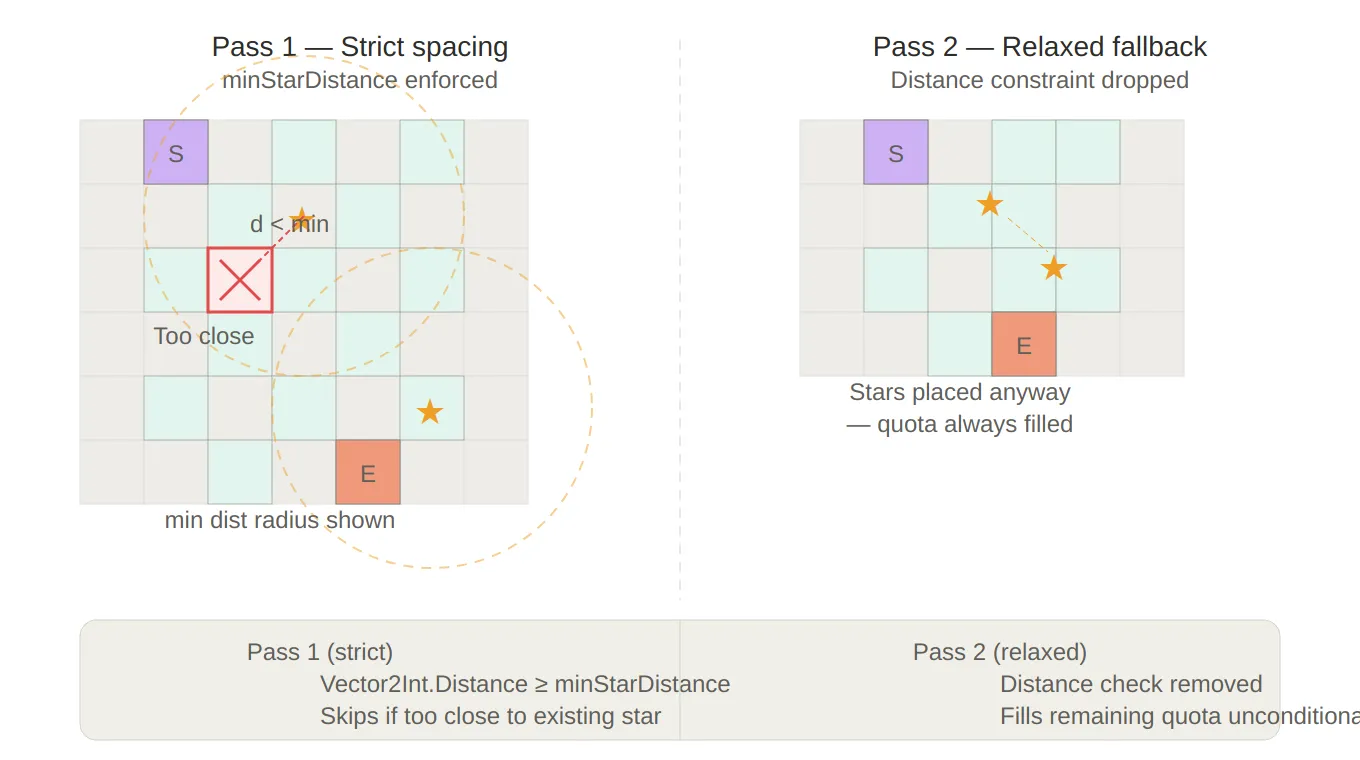
Star placement — Pass 1 shows the minimum-distance exclusion circles around each placed star, with a rejected candidate (red ✕) that falls inside one. Pass 2 shows a small maze where no spread-out candidates remain, so the quota is filled anyway by placing stars close together — guaranteeing the level never breaks.
Configuration: The GeneratorParameters_SO
All generation parameters live in a
ScriptableObject, making them adjustable in the Unity inspector without touching code:public class GeneratorParameters_SO : ScriptableObject { public int gridWidth = 10; public int gridHeight = 10; public bool randomEnd = true; public int endMaxHeightPercent = 20; // end stays in the bottom 20% of the grid public int inputSeed = -1; // -1 = random; set for fixed test levels public TileDatabase_SO tileDatabase_SO; [Range(0, 20)] public int starCount = 3; [Range(1, 10)] public int minStarDistance = 2; }The
RuntimeLevelProgressionsystem modifies these parameters before each level — growing the grid size, adjusting hazard ratios, and changing star count as the player advances. That system is covered in its own deep-dive.
Summary
The summary of the system is the following:
Component Role GridFactoryInitialises an all-wall grid UnionFind<T>Cycle detection for Kruskal’s; path compression + union by rank MazeGenerator.GenerateKruskalMazeBuilds the carved passage set MazeGenerator.ApplyMaze3-pass tile decoration GridUtilsStart/end placement, shuffle, safety queries StarPlacer2-pass star placement with distance fallback GeneratorPipeline entry point, seed management GeneratorParameters_SODesigner-configurable generation settings The key design choices that hold everything together:
- Seeded
System.Randomrather thanUnityEngine.Random— deterministic, no global state - Struct-based
CellDatain a 2D array — allocation-free pipeline, no GC spikes on mobile refaccessors — in-place mutation without boxing- 3-pass decoration — each pass has access to the output of the previous, enabling context-aware rules
- 2-pass star placement — strict constraint with a guaranteed fallback prevents levels from breaking on small grids
Created on February 2026