-
Unity Tips - Inspector Attributes
For the Swiss Game Academy, I had to build a project to teach students some good practices to use in Unity. The first chapter of the course was focused on Attributes, ScriptableObjects, Enums and Inheritance.
This post talks about the Unity Attributes.Example
When building tools or data-driven systems in Unity, the Inspector can quickly become cluttered. Luckily, Unity provides attributes like
[Header],[Tooltip],[Range], and more to make your scripts much more user-friendly!Here’s a quick example with a ScriptableObject Item:
[CreateAssetMenu(fileName = "New Item", menuName = "Alchemist's Inventory/Item")]
public class ItemData : ScriptableObject
{
    [Header("Core Item Information")]
    [Tooltip("The name of the item shown in the UI.")]
    public string itemName;

    [Tooltip("The description of the item.")]
    [TextArea(3, 5)]
    public string description;

    [Tooltip("The monetary value of the item.")]
    [Range(0, 999)]
    public int value;

    [Space(15)]
    [Header("Item Graphical Settings")]
    [Tooltip("The icon that represents this item.")]
    public Sprite icon;

    [Tooltip("The prefab spawned in the world.")]
    public GameObject prefab;

    [Tooltip("Trail colors when the object is spawned.")]
    [ColorUsage(true, true)]
    public Color[] trailColors = new Color[2];
}
Result
Here are the results:
Before using attributes After using attributes 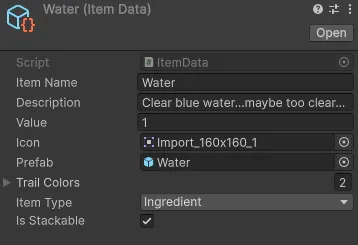
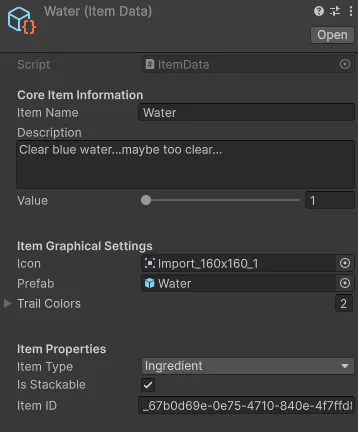
In this case fields are still readable but this is a simple item. On much larger ones, the result might be much more confusing.
Conclusion
That is why we use Attributes like:
[Header("The name of the header")]To creates categories in the Inspector for readability[Tooltip]To add hover descriptions (great for designers on your team)[Space]to add visual separation between sections.[Range]to add a slider, preventing invalid values[TextArea]to let you write multi-line text fields[ColorUsage]to enable HDR colors for vibrant effects
These tiny attributes may look simple, but they dramatically improve workflow and collaboration, especially when working with non-programmers.
There are multiple other attributes that can be useful and a github page lists some of the most useful ones HERECreated on September 2025 -
Swiss Game Academy - Advanced Programming Course - AlchemisTeddy
During summer 2025, I gave a course about “advanced” programming practices in general and in the Unity 6 engine for the Swiss Game Academy (SGA) at the HEIA-FR University
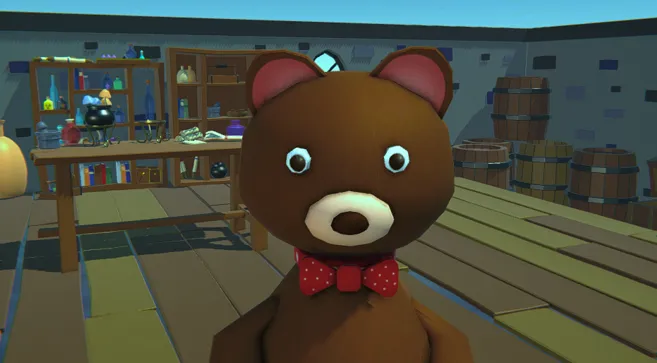
This course was designed to go beyond basic scripting and teach students how to think like software architects.
Created on August 2025 -
Bachelor Thesis - 3D Fur Rendering
During my last year of bachelor’s degree in Game Programming, I worked on a HLSL Fur rendering project in Unity. Project for which I wrote a memoire that can be found in a pdf version below
Created on July 2024 -
Billy The Zombie
Created on June 2022 -
Mhard
Mhaaaaard is a Gameplay student project created entirely from scratch in One week with the help of a 2D animation student.
Created on June 2022 -
Pcg Game
This little game was a project I worked on for one week during my first year of bachelor’s degree to learn and integrate procedural generation.
Created on June 2022 -
Run4YourLight
Created on August 2021 -
SynthCity
This game was made with Unity in 2 days at the SwissGameCenter’s LvlUp GameJam at Fribourg in Switzerland.
It was my first experience with Unity and during the game jam I discovered how to program a game from start to end and create simple visual effects using Unity’s Shader Graph
Created on February 2021